
 10 Mins Read
How to Capture Leads From Your Website 24/7 With AI
A practical guide to AI lead capture for websites – why visitor traffic never actually stops at 5 pm, what...

| Quick summary You do not need a developer to add an AI lead capture agent to your website. This guide walks through a no-code deployment, step by step: what to prepare, how installation actually works on WordPress, Webflow, Shopify, or a custom site, and how to train and launch it in under a week. |
“Can you add a chatbot to the site?” is a simple request. “Can you file a developer ticket, wait for the sprint, test it, and hope nothing breaks?” is what it too often becomes.
That gap is exactly why no-code AI lead capture exists. This guide shows what deploying one actually looks like, in plain steps, without a single line of code.
Because many tools were built assuming a developer would install them. Custom scripts, backend hooks, and manual configuration files all sound routine to an engineering team and impossible to everyone else.
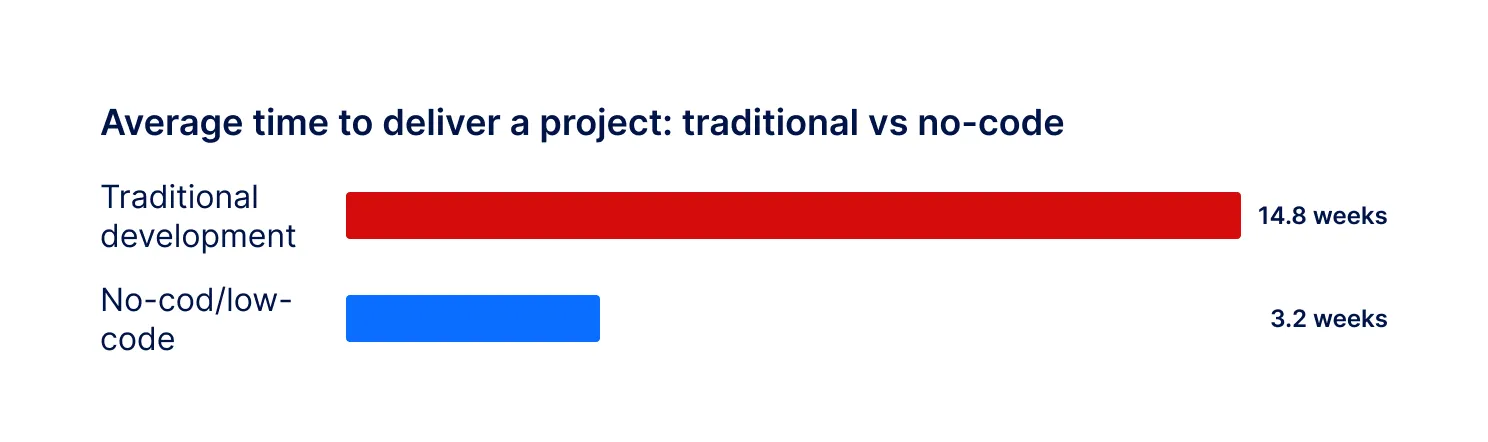
The demand for this kind of quick, self-serve capability keeps rising.Industry research on low-code adoption reports that no-code and low-code projects are completed in an average of 3.2 weeks, compared with 14.8 weeks for traditional development, a roughly 74% reduction in delivery time. The same body of research finds that 72% of IT leaders say they are blocked from strategic work by project backlogs.
| Did you know? A 2026 low-code market analysis found that 58% of small and medium-sized businesses now use at least one no-code tool, up from 44% just two years earlier. No-code deployment is not a workaround anymore; it is becoming the default way smaller teams add new capability to their site. |
If a developer ticket for a chatbot can sit for weeks, and every week costs you visitors who leave without a word, the case for no-code deployment writes itself.
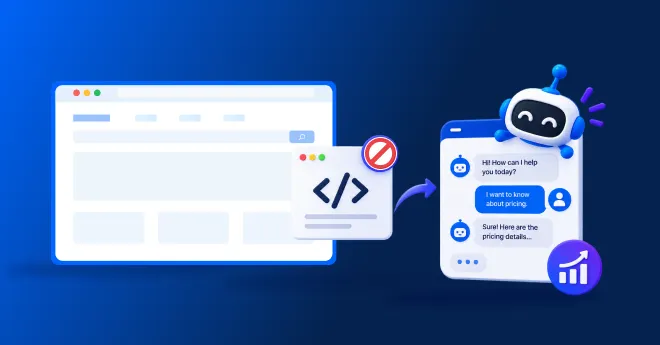
No-code AI lead capture means installing and configuring an AI chatbot that qualifies website visitors entirely through a visual dashboard and a single script tag, without writing or editing any code.
The “no coding required” part covers two things: getting the chatbot onto your site, and teaching it about your business. Both should be point-and-click, not something you hand to engineering.
A smooth no-code lead capture chatbot deployment takes about fifteen minutes of preparation. Gather these first.
Here is the actual process, step by step, using a script-tag installation like Corvexa’s.
| Tip Most website builders have a search bar in their settings. Typing “custom code,” “header scripts,” or “tracking code” almost always finds the right place to paste a script tag, even if you have never touched your site’s backend before. |
The chatbot works the same way once installed. Only where you paste the script tag changes.
| Platform | Where the script goes | Typical time |
| WordPress | A header/footer plugin, or your theme’s custom code area | A few minutes |
| Webflow | Site-wide custom code, in Project Settings | A few minutes |
| Shopify | theme.liquid, via the theme code editor | A few minutes |
| Custom-built site | Before the closing </body> tag | A few minutes, or ask whoever manages the site |
Corvexa works on WordPress, Webflow, Shopify, and any custom-built site with the same single script tag, so switching platforms later does not mean starting over. Seeintegrations for the full list of supported connections.
Deployment gets the chatbot on your site. Training makes it useful. This step is also entirely no-code.
This is where a chatbot becomes a lead capture agent rather than just an FAQ bot, and it happens entirely through forms and toggles.
| Note Launch on one or two high-intent pages first, such as pricing and your main product page, rather than your entire site at once. It is easier to review a smaller set of conversations and fix gaps before expanding everywhere. |
No-code deployment covers the vast majority of B2B lead capture needs: intent detection, qualifying questions, scoring, CRM sync, and human takeover. It is not meant to replace deeply custom, product-specific AI development.
A realistic no-code timeline looks like this.

With Corvexa, guided onboarding is included, and the site can go live within 48 hours of your onboarding call. Seehow it works andpricing, which starts at $39 a month.
Because every week without qualification is a week of lost data on your best visitors. Harvard Business Review found that firms who contacted a lead within an hour werenearly seven times as likely to qualify it as those who waited even one hour longer. A months-long developer project delays that first hour by months, not minutes.
No-code deployment does not just save engineering time. It compresses the gap between “we should really do something about our leads” and actually doing it, from a quarter to a week.
This matters as much as the time saved. A custom-built AI chatbot typically means a discovery phase, a build, integration work and testing, usually costing five figures and taking weeks or months.
A no-code, configurable platform skips most of that. There is no lengthy discovery phase because the core system already exists; what you are doing is configuration, not construction. Corvexa’s Starter plan begins at $39 a month, with guided onboarding included rather than billed separately. For a common, well-understood need like website lead capture, this is usually the faster and cheaper path, even though a fully custom build remains the right choice for problems that are genuinely unique to your business.
“No-code” does not have to mean “no help.” The best platforms pair self-serve tools with real guidance, so you are not left guessing at every step.
Corvexa’s onboarding covers understanding your business, reviewing your competitors, configuring your intent paths, and defining your high-intent triggers, before the single script tag goes live.
You do not need a developer, a sprint cycle or a budget approval process to add AI lead capture to your website. A no-code deployment means one script tag, a guided setup for training and rules, and a working agent live in days.
Prepare your ideal customer definition, paste the tag, train it on your real content, test it thoroughly, and launch on your highest-intent pages first. That is the whole process for no-code AI lead capture, and none of it requires code.

 How to Deploy an AI Lead Capture Agent on Your Website Without Coding

A practical guide to AI lead capture for websites – why visitor traffic never actually stops at 5 pm, what...
Quick summary Forms have run websites for decades. AI lead capture is newer and often converts more visitors, but not...
Quick summary Inbound leads pile up, reps get buried, and the usual fix is to hire another SDR. This guide...