How to Reduce Lead Response Time to Seconds, Not Hours
Published
on: Aug 31, 2026
Table of Contents
Rapid lead follow-up is a proven driver of revenue. Companies that respond to inquiries within minutes (vs. hours or days) see dramatically higher conversion rates.
Modern solutions from AI chat/voice bots to automated routing and messaging enable “instant engagement” without hiring more staff. Key benefits include 5× faster first replies, 20100× better lead qualification, and large boosts in pipeline and win rates.
To succeed, teams should define clear qualification criteria, integrate bots and workflows with CRM or marketing platforms, and monitor performance (speed-to-lead, conversion lift, etc.) closely.
Common pitfalls include over-automation without exception handling, poor data quality, and stale flows. A phased implementation with a feedback loop – from triggers (web form, chat, call) through AI-driven routing to reps – ensures leads never languish unaddressed.
In practice, organizations that implemented such systems saw lead assignment times cut by ~95% and pipeline conversions jump sharply. A quick rollout checklist and dashboard (e.g. first-response time, leads auto-qualified, cost per lead) help sustain these gains.
Technology Categories for Instant Response
Technology Categories for Instant Response
Chat/Voice AI (Bots): Conversational AI tools (chatbots on websites or WhatsApp, and voicebots on phones) can engage prospects immediately. These bots ask qualifying questions, capture details, and either route hot leads to sales or kick off nurture flows. For example, Landbot’s platform advertises seamless form-less chat that integrates with CRMs like Salesforce or HubSpot (via native connectors or webhooks) to “export lead data” in real time. Similarly, AI voice assistants (e.g., Voicetta, SigmaMind) answer inbound calls 24/7, qualify queries, and update lead records automatically. By handling routine Q&A or scheduling, AI bots free reps to focus on complex deals while prospects get instant answers.
Automated Routing: Dedicated routing/orchestration systems (like LeanData, Plauti, or Salesforce’s own assignment rules) ensure each new lead is instantly sent to the right team or rep. These tools connect signals from webforms, marketing platforms, chatbots, or calls into a central workflow. For instance, LeanData customers report nearly real-time routing after implementation, cutting average lead-response time from ~24 hours to under 5 minutes. Effective routing automations use CRM data (territory, product line, account ownership) and real-time logic so no lead “sits cold” in limbo. They also feed leads into backup queues or alerts if SLAs aren’t met.
Multichannel Messaging Automation (SMS/WhatsApp/Email): Instant follow-ups via the channel your prospect prefers can bridge gaps. Platforms like Twilio, MessageBird, or Gupshup let you auto-send SMS/WhatsApp messages the moment a lead is captured. Likewise, marketing/CRM tools (HubSpot, ActiveCampaign, Mailchimp) can fire automated emails triggered by form submissions. For example, as soon as a chatbot qualifies a lead, it can trigger an SMS with a meeting link or a welcome email. These short messages (“Thanks for your interest, we’ll be in touch in 60 seconds”) keep prospects engaged while routing finishes. Newer CRMs even let chatbots invoke webhooks to launch email/SMS actions from within chat flows.
Webhooks & Integration Platforms: Real-time connectivity is vital. Webhooks (HTTP callbacks) let lead capture systems instantly notify your automation workflow or chatbot. For example, a website form submission can fire a webhook into Make.com or Zapier, which then calls an AI scoring API and updates the CRM. Integration platforms (Make.com, Zapier, n8n) and iPaaS (Workato, Tray.io) connect disparate tools without code. They route data (lead details, form answers) into bots, CRMs, and messaging services on the fly. This plumbing ensures “no manual handoffs” leads immediately flow through qualification logic and into pipelines.
Implementation Steps
Implementation Steps
Define Requirements: Clarify what qualifies a “good” lead (industry, role, budget, urgency) and which channels you’ll use (website, call, social, etc.). Decide SLAs (e.g., contact within 1 minute for hot leads). Identify data needs (e.g., form fields, chat questions) and compliance (opt-ins, data consent). Ensure CRM fields and lead scoring models are up-to-date for new automation.
Choose Tools & Set Up Bots: Build or configure your chat/voice AI flows. For chatbots (e.g., ManyChat, Landbot, Intercom), create a conversational script: greet visitor, ask key qualification questions (company size, need, budget), and capture contact info. For voice AI (e.g., Voicetta, Twilio Autopilot, Dialogflow), design an IVR or outbound call script to verify details and interest. Use no-code builders or templates for speed. Implement webhooks/API calls in the bot to log responses and scores.
Integrate with CRM: Connect your bots and messaging channels to the CRM via APIs, native integrations, or middleware. For example, use Landbot’s Salesforce/HubSpot blocks or Zapier modules to create CRM leads when a chat concludes. Use a webhook from your webform or chatbot to trigger a Make.com scenario that calls AI (if used) and then posts data into Salesforce/HubSpot, including lead score and source. Ensure every path (qualified vs. nurture) writes a record: e.g., qualified leads get a new Lead or Contact in CRM; unqualified leads go into a nurturing list (tagged accordingly).
Automate Routing & Notifications: In the CRM or a routing tool (LeanData, custom workflows), set up rules to instantly assign new qualified leads to reps. This might be by territory, industry, or round-robin queues. Also configure alerts (e.g., email/Slack notification) to the assigned rep or team the moment a lead is created. Example: a Make.com scenario can send a Slack message with lead details to the rep’s channel. This ensures a rep is aware of the lead in seconds.
Implement Drip and Nurture Paths: For leads that don’t yet qualify, configure automated email/SMS nurture sequences. E.g., immediately send a thank-you SMS or email, then drop them into a 3–5 touch sequence of value-content (whitepapers, case studies) instead of a sales push. Tools like HubSpot Sequences or ActiveCampaign can handle this. Log unqualified leads in a CRM “Nurture” stage, with a future task to re-evaluate (e.g., in 30 days).
Test & Iterate: Before wide rollout, test every path. Submit test inquiries to ensure chat/voice logic works, data lands in CRM, routing triggers correctly, and notifications fire. Review bots’ conversation logs to refine wording and catch bugs. Establish a rapid feedback cycle (e.g., weekly reviews) to tune the AI prompts or rules based on real leads. Include human fallback options for unexpected inputs.
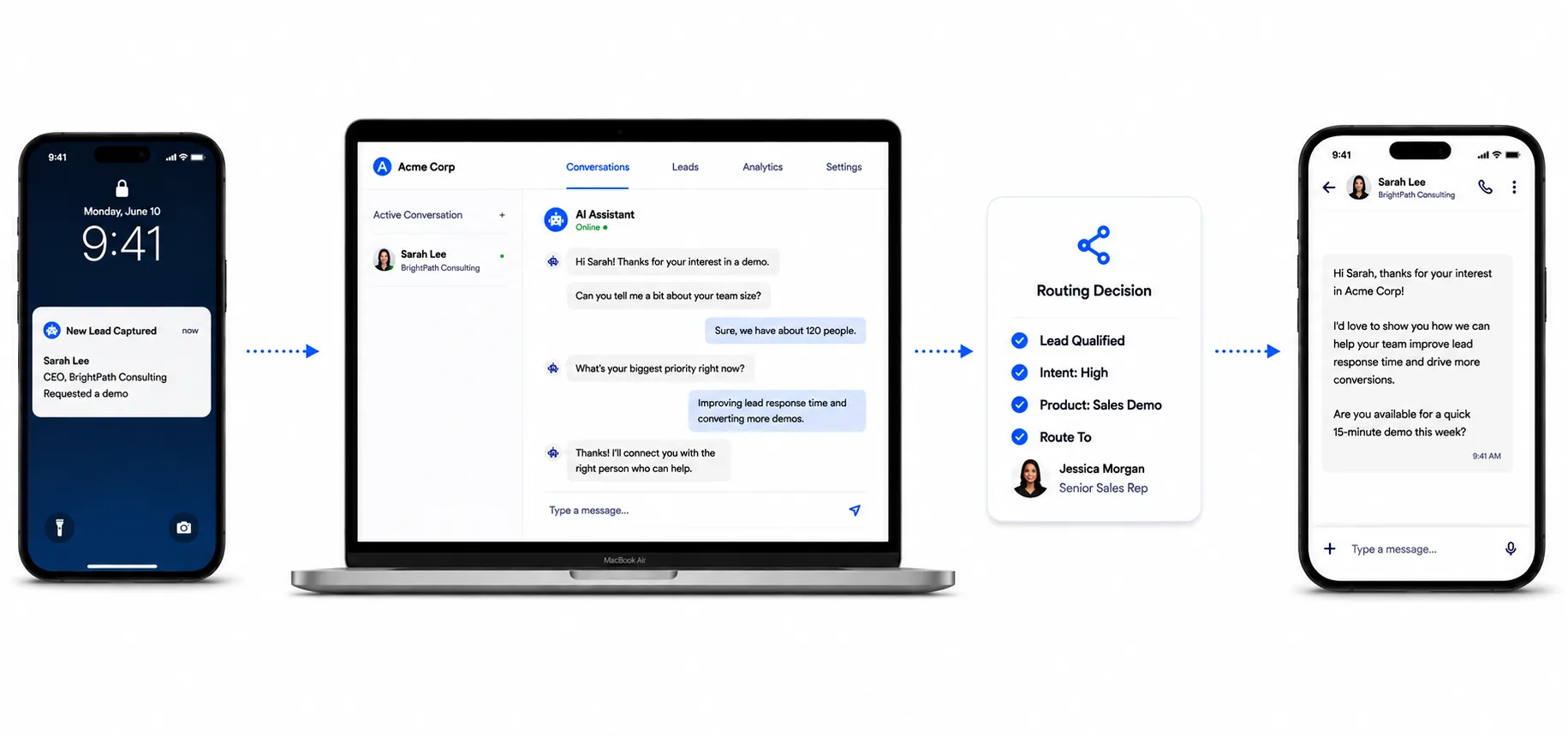
Data Flow Diagram: The diagram below illustrates a typical automated lead-response flow. A lead comes in via web form/chat/call, triggers the AI chatbot, which qualifies and writes to the CRM. An automated router then assigns the lead and notifies a rep, or (if unqualified) kicks off a nurture campaign.
Key Metrics and Benchmarks
Key Metrics and Benchmarks
Speed-to-Lead: Time from inquiry submission to first contact attempt (by bot or rep). Benchmark: Aim for <1–5 minutes for initial engagement. Studies show contacting a lead within 5 minutes vs. 30 minutes can increase conversion rates ~20×. A Harvard Business Review study also found leads contacted within an hour are 7× more likely to qualify than those after an hour. Track median response times weekly; top performers are measured in seconds, not hours.
First Response Time: Specifically measure time until the first reply (chat message, SMS, or email) is sent. Many companies average 42+ hours of latency, but best practice is immediate (few minutes). Tools should log this automatically (e.g., use CRM timestamp fields for “Lead Created” vs. “Lead Claimed” or “Chatbot Response Sent”).
Conversion Lift: Compare conversion rates (MQL→SQL or opp→close) before and after implementing automation. For example, one sales ops team cut their response time to ~5 minutes and saw a ~20% boost in conversion rates. LeanData customers like Uber reported a 68% jump in deal velocity after improving speed-to-lead. Calculate the difference in qualification rate and revenue per lead to quantify lift.
Cost per Lead/Conversion: Automation can dramatically reduce lead-response labor costs. One analysis showed a single SDR spending ~40% of time on lead response equated to ~$22K/year of salary. A one-time $3.5K automation build could break even in ~60 days. Track marketing spend divided by the number of qualified leads/opportunities now (CPL). As responsiveness improves, more leads convert with the same spend, effectively lowering cost per converted lead.
SLAs and Compliance: Set internal SLAs (e.g. 100% of hot leads answered within 60 seconds). Dashboards should flag any misses. Also monitor data quality (e.g. % of leads with valid email/phone) since bad data can stall automation.
Common Pitfalls and Mitigations
Common Pitfalls and Mitigations
Over-Automation / No Human Path: Building a bot without exception handling can frustrate leads. Don’t let bots sound too scripted or make promises they can’t keep. E.g., if a question is unclear, have a fallback: “A sales specialist will review this and reply shortly.” Avoid “pretending” a lead was personally reviewed when it wasn’t. Mitigation: Define clear exception paths (when to escalate to a human) and always allow easy hand-off. For instance, script a “Human Assist” trigger in the chatbot if the user asks for something beyond scope.
Poor Data/Logic: Automation is only as good as its rules and data. If your lead criteria or routing logic is fuzzy, bots will mishandle leads. LeanData notes that delays often happen because “enrichment took too long” or “routing logic misfired”. Mitigation: Validate and clean data sources first (email/phone formats, segmentation rules). Test the decision tree. Keep qualification criteria simple and measurable (e.g., revenue > $X). Define exactly what should trigger each path.
Stale or Overly Complex Flows: A bot built once and forgotten will fail. If your product/offers change, the chatbot’s scripts can become inaccurate. Similarly, too many questions can kill engagement. The pitfall is trying to collect every detail upfront. Mitigation: Regularly review bot performance data (e.g. dropout rates at each question). Start with a minimum viable flow and refine: a small cycle of improvements often beats over-engineering. Ensure ownership: assign someone (sales ops or marketing) to update scripts and FAQs monthly.
Integration Failures: Leads can slip through cracks if APIs or webhooks break (expired tokens, quotas). Monitor error logs in your integration platform. Mitigation: Set up alerts for failed webhook calls or API errors. Use middleware (Make.com, Zapier) with built-in error handling (retries, email alerts). Always include duplicate checks and record matching rules to prevent creating duplicate leads in your CRM.
Ignoring Metrics: Without tracking, it’s impossible to know if response times actually improved. Mistake: assume “fast reply = more deals” without measuring. Mitigation: Build dashboards (Salesforce reports, BI tools) to track SLA adherence (e.g., % of leads contacted within 5 min), conversion rates by channel/time, and rep response times. Regularly review with the team to spot issues quickly.
Checklist for Rollout
Checklist for Rollout
Define goals & criteria: Who are our target leads? What questions will qualify them? (e.g., budget, timeline, location)
Set up tracking: Decide where to log bots’ actions and lead statuses in CRM (custom fields, tags). Prepare baseline reports.
Build simple bot prototype: Use a pilot chat flow or voice IVR to ask minimal questions and capture contact info.
Connect to CRM: Test end-to-end: submit a form/chat, verify lead is created in CRM with correct fields.
Configure routing & alerts: Set automated lead assignment rules in CRM. Test that assigned reps get notified instantly (email/Slack).
Implement nurture campaign: Create email/SMS templates and automation for non-qualified leads. Schedule and QA them.
Train the team: Ensure sales understands the new process and how to handle bot-qualified leads. Assign owners for monitoring.
Go live & monitor: Launch with a subset (e.g. one channel or region), measure key metrics weekly, and iterate.
Recommended Monitoring Dashboard Fields
Recommended Monitoring Dashboard Fields
Time to First Response: e.g., “Seconds between lead submission and first bot/reply”.
Leads Auto-Qualified: % of leads flagged as high-quality by bot vs. total.
Speed-to-Lead (by rep): Time from CRM record creation to rep outreach.
Conversion Rate (to Opportunity): Compare for leads contacted <5min vs. slower follow-up.
Cost per Qualified Lead: Marketing spend ÷ number of auto-qualified leads.
Drop-off Points: % of leads exiting after each bot question (to identify friction).
SLA Compliance: % of leads meeting defined response time SLA.
Revenue Impact: Pipeline generated and deals won from bot-qualified leads.
Tracking these will validate ROI (many teams see double-digit pipeline lift after instant follow-up) and highlight any bottlenecks.
In summary, speeding up lead response to seconds relies on stitching together smart bots, real-time integrations, and clear rules. Used wisely, instant qualification bots and automation act like around-the-clock SDRs – capturing interest the moment it appears and passing only the best leads to sales. As LeanData’s customers found, “with faster follow-up and cleaner routing, we’ve seen conversion improve by ~20% and deals move faster.” By following best practices above, businesses can “stop wasting time” on cold leads and start closing more deals.
Priya Patel
With expertise in the technology and software industry, Priya specializes in in-depth research, understanding complex concepts, and translating them into well-structured, informative blogs that are easy for readers to follow.

 11 Mins Read



 How to Reduce Lead Response Time to Seconds, Not Hours