Accelerate Lead Response: Instant Qualification Bots, AI SDRs & Speed-to-Lead
Published
on: Sep 02, 2026
Table of Contents
Research consistently shows that lightning-fast follow-up drives dramatic gains: contacting a new lead within 5 minutes makes you 100× more likely to connect and ~21× more likely to qualify it compared to a 30-minute delay.
In fact, ~78% of deals go to the first responder, and conversion rates can jump by hundreds of percent with near-instant replies. Instant lead qualification bots and AI-powered SDR platforms make this possible without hiring more reps. These tools use chat/voice AI to engage inbound visitors 24/7, automatically ask qualification questions, score or segment the lead, and push only the hottest leads to sales.
The result is higher conversion, lower cost-per-lead, and a burst of pipeline growth. In the sections below, we’ll define these technologies, outline their capabilities, deployment steps, and KPI benchmarks, discuss CRM integration and case studies, and provide a vendor comparison table.
The goal: stop wasting time on unqualified leads and make every inquiry count.
Definitions and Landscape
Definitions and Landscape
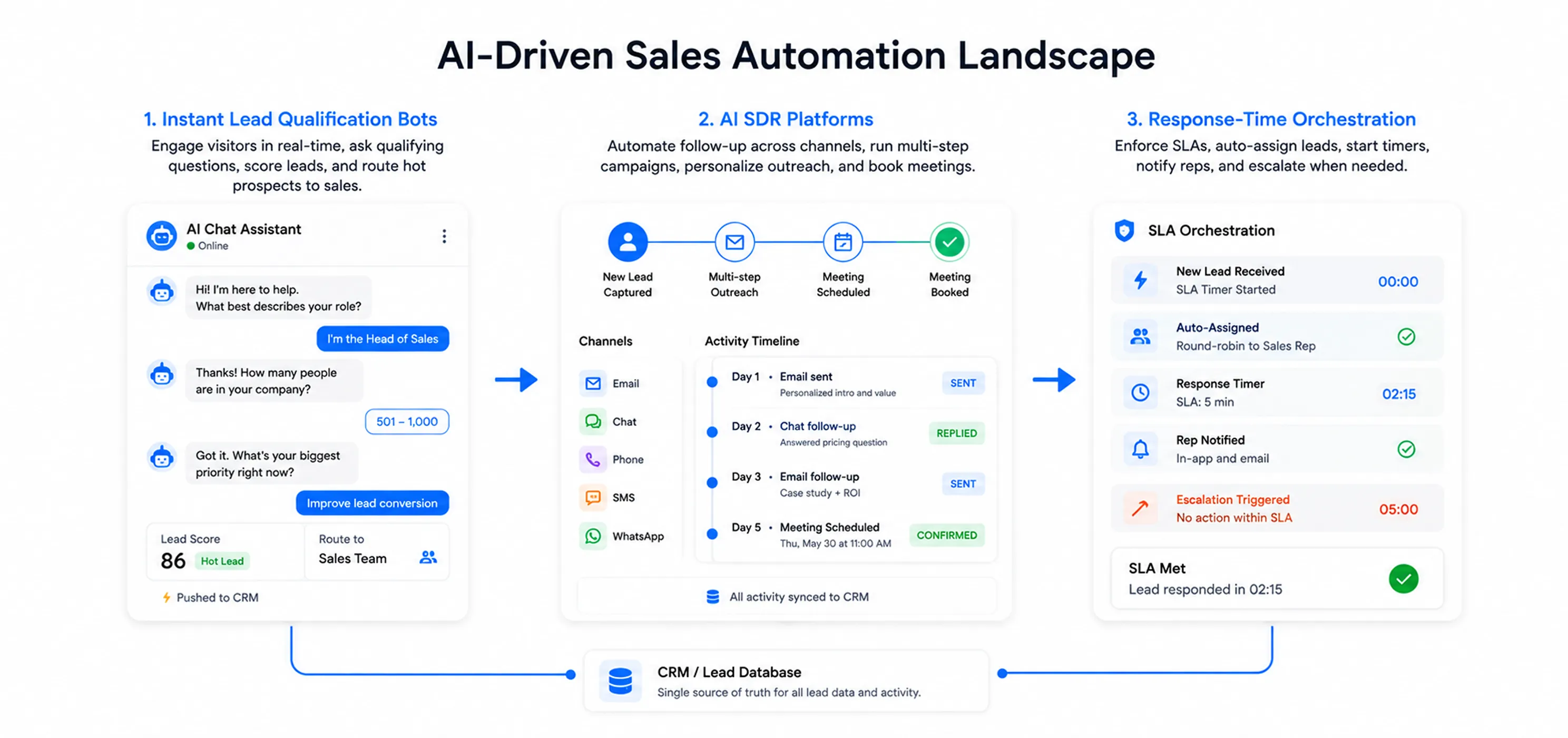
Instant lead qualification bots are AI-powered chat or voice agents embedded in your web funnel. They greet site visitors the moment they arrive and ask qualifying questions (company size, budget, needs, etc.) to score leads automatically.
Think of them as digital receptionists that never sleep (see image). They capture every inquiry, screen it against your ideal customer profile, and immediately route hot prospects to sales. In practice, these bots live on websites, landing pages, WhatsApp, SMS, or other channels and push lead data into your CRM.
Automated AI SDR platforms take this further. An AI SDR is software that uses machine learning to automate the full SDR role: outbound prospecting, inbound follow-up, multi-step email/chat campaigns, and meeting scheduling. Inbound forms trigger an AI agent that follows up via chat, email,l or even phone; the agent draws on CRM data (web cookies, past activity) to personalize outreach and can schedule appointments on the spot. Outbound, these tools can sequence hundreds of messages with A/B testing, freeing humans to focus on closing.
Finally, response-time orchestration tools (e. g., Default, LeanData, Alltomate) focus on enforcing SLAs and no-lead-left-behind processes. They integrate with your CRM or lead database to instantly assign new leads (round-robin or rule-based), start a response timer, send notifications, and escalate leads if no action occurs within the SLA window. For example, Default’s platform “starts an SLA timer” on each lead and “escalates if no action occurs”, ensuring timely follow-up. These systems underpin speed-to-lead by making rapid response an automated process.
Key Capabilities
Key Capabilities
Modern lead response platforms bundle several key functions:
24/7 Chat & Voice AI: Bots with natural language understanding greet leads immediately, answer questions, and ask qualification questions. They use NLP/LLMs to understand intent. Voice bots can even answer phone calls within a second to screen callers. Leads get human-like, personalized interaction any time of day.
Routing & Assignment: Qualified leads are routed instantly to the right rep or team via rules (e.g., territory, lead score). Options include round-robin, geography/industry filters, or skills-based assignment. No lead sits idle; if no rep responds, the system can reassign or escalate per the workflow.
CRM Integration: Every solution pushes data into CRMs like Salesforce, HubSpot, or Dynamics. Bots capture lead info and conversation transcripts and log them automatically. Workflows then trigger follow-ups inside the CRM. Leading platforms provide native connectors (e.g., Default integrates directly with Salesforce & HubSpot; Qualified syncs with HubSpot) so that lead records, notes, es and notifications are centralized. Webhooks and APIs let marketers connect web forms or chat widgets to nearly any system (via Zapier, Integromat, custom code, etc.).
Lead Scoring & Qualification: Systems can apply scoring models on the fly. As the bot asks questions, it can compute a fit or intent score (often using your ICP criteria or even AI-predicted scores). Only “hot” leads pass the threshold to sales; others go to nurture tracks. This reduces wasted reps’ time and ensures handoffs only for high-quality leads.
Analytics & Dashboards: These tools track performance and SLA compliance. Common KPIs include average response time, chat engagement rate, and outcomes like appointment booked or form submitted. Vendors often provide dashboards showing conversion funnel stats for bot chats, response compliance, and rep activity. (For example, Default and Alltomate emphasize reporting on SLA breaches and lead resolution times.)
Service-Level (SLA) Handling: You can define strict follow-up SLAs (e.g., 5 minutes for demo requests). The system will then automatically notify or escalate if those are missed. For example, rules like “if no reply in 10 minutes, email manager” or “after-hours inquiries route to on-call queue” are built in. This automation enforces accountability, so leads don’t fall through the cracks.
Implementation Steps and Checklist
Implementation Steps and Checklist
Deploying an instant response system typically involves:
Define Qualification Criteria: Clarify your ICP and what makes a lead “sales-ready” (e.g,. company size, budget, timeframe). Draft the questions or data points your bot should collect. For SLAs, set targets (e.g., reply to demo requests in 5 min, general inquiries in 30 min) and get leadership buy-in.
Select & Configure Tool: Choose a platform that fits your use case (see vendor criteria below). Set up the chatbot or AI SDR agent by integrating its script into your website (via embed code or chat widget) and any other channels (WhatsApp, Facebook, email). Many platforms offer no-code builders to design conversation flows. Use the ICP questions from Step 1 in your flow, with logical branches.
Integrate with CRM: Connect the bot to your CRM or marketing system. Map fields so that when a lead completes the chat form, a new record is created or updated in Salesforce/HubSpot/Dynamics. Ensure any existing forms or lead sources feed into the same system. Also configure real-time alerts: e.g., “Send an email or Slack message to SDR A when a new SQL is captured”. If using Slack/MS Teams, set up those integrations too.
Set Routing & SLA Rules: In your platform or CRM, create lead routing logic. This may involve assignment rules (round-robin teams, sales territory rules) and SLA timers. For example, start a “60-second timer” when a high-intent lead is logged and set a rule to escalate or notify if the timer elapses without a response. Configure fallback flows (e.g., second agent or manager) for missed SLAs.
Test Thoroughly: Simulate leads to ensure data flows correctly. Chat with the bot on desktop and mobile to verify the conversation, see that CRM records look right, and confirm notifications fire as expected. Test edge cases (bot says “sorry I don’t understand” to unknown input) and escalation paths. Iterate on phrasing and flow based on feedback.
Train & Launch: Brief your sales team on the new process (e.g., how to find bot-captured leads, best response practices, and that leads will start coming in instantly). Then launch, even a small pilot. Monitor the first few days to catch any bugs.
Monitor & Optimize: After go-live, track metrics (see next section) and review transcripts or logs. Tweak the bot’s script or qualification criteria regularly (market conditions change, products update, etc.). Update integrations or routing rules as your team structure evolves. Consider A/B testing different opening messages or qualification paths to continuously improve.
Key Metrics and Benchmarks
Key Metrics and Benchmarks
Once running, measure these KPIs (with rough benchmark ranges from industry studies and vendor reports):
Speed-to-Lead (Response Time): Average time from lead capture to first response. Benchmark: High performers aim for <5 minutes (often under 1 minute). The average B2B response time is ~42,47 hours, so anything under 10 minutes is excellent.
Qualification/Connection Rate: Percentage of leads that get a meaningful conversation (SQL or book a meeting). Studies show contacting in <5 min yields ~21× higher qualification odds than at 30 min. Vendors often report reaching >95% of calls/chat instantly with bots (versus ~50% for humans).
Conversion Lift: Improvement in deal conversion or booked meetings. Research (Velocify) found contacting leads within 1 minute gave a ~391% lift in conversions compared to slower follow-up. In practice, companies using chatbots/AI SDRs often report 2,5× higher meeting-booking rates. For example, one case saw a jump from 12% to 40% conversion by eliminating callback delays.
First-Responder Win Rate: ~78% of B2B customers buy from the first company to respond. If your team consistently beats competitors to leads, expect a similar fraction of deals.
Lead Volume & Pipeline Growth: Expect more leads captured (since the bot never “misses” a chat) and faster qualification. In one example, deploying chatbots delivered a 496% year-over-year jump in contributed pipeline and a 454% rise in booked meetings. Many marketers cite double-digit to triple-digit pipeline lift after implementing instant bots.
Cost per Lead/Meeting: AI dramatically cuts labor costs. A recent analysis estimated an AI SDR costs ~10,50perleadvs~300,$500 for a human SDR. In Voicetta’s case study, automating call intake cut cost-per-lead by ~30% while raising qualification rates to 95%. ROI can be huge; for example, Wrike reported a 15× ROI from its chatbot deployment.
Other KPI’s: Chat engagement rate (who starts a conversation), chatbot response accuracy, SLA compliance rate (percent of leads responded to within SLA), and sales cycle length reduction. Some vendors report lead capture rate tripling when forms are replaced with interactive chat.
Tracking these metrics (ideally via your CRM dashboard) will quantify the gains from “response-time reduction.” Vendors often highlight speed-to-lead, qualification, and cost metrics in their case studies (see below).
CRM Integration Patterns
CRM Integration Patterns
These tools typically connect into major CRMs through APIs or built-in apps:
Salesforce: Many solutions use Salesforce’s REST API or pre-built Managed Packages. For example, Default hooks into Salesforce to create Lead/Task records and enforces routing in real time. Salesforce’s Lightning Flow or Process Builder can launch bots or trigger SLA timers on Lead creation. Chatbots can also integrate via Salesforce Live Chat or Einstein Bots.
HubSpot: Chatbots often integrate directly, e.g., Qualified’s HubSpot integration uses form submissions and cookie data to enrich leads, then writes results back into HubSpot CRM. HubSpot’s native chatflows allow responses and assignments within its ecosystem. Custom webhooks can push chat transcripts to HubSpot tickets or contacts.
Microsoft Dynamics: Integration is usually via Power Automate or custom plugins. Bots can submit leads via Dynamics Web API; Dynamics workflows handle routing and tasks.
Other Tools/Webhooks: If a CRM plugin isn’t available, most platforms support generic webhooks or middleware (Zapier, n8n). For example, a chat widget can be set to POST a webhook to any URL (triggering CRM record creation), or to send a message to Slack/email to alert reps. Alltomate, for instance, describes using Slack/email/SMS notifications and then connecting back into the CRM workflow.
Pitfalls and Mitigation
Pitfalls and Mitigation
Even smart automation can backfire if not done carefully. Key pitfalls and tips:
Over-automation and Poor UX: A bot that feels robotic or irrelevant will turn off prospects. Always allow easy human handoff (e.g., “Can I connect you with a rep?”). Test the flow to ensure the chatbot only asks relevant questions and uses natural language. Some case studies warn against DIY solutions that add latency or feel unpolished. Mitigation: Use proven conversation templates, and prefer platforms with good NLP.
Static or Outdated Criteria: Markets and products change. If qualification logic (questions/thresholds) isn’t updated, the bot may misclassify leads. Mitigation: Review and revise the bot’s qualification criteria at least quarterly (sales feedback can drive changes). Monitor reports; if too many leads are going to nurture, your thresholds may be off.
Data Quality Issues: Poor lead or CRM data can bottleneck automation. If your CRM has duplicate records or if forms are incorrectly mapped, bots may not route leads properly. Mitigation: Clean up your CRM, and validate the integration (make sure chat fields correctly populate CRM fields).
Privacy/Compliance: Automated chat and email bots can unintentionally violate consent rules (e.g., under GDPR/CCPA/TCPA) if prospects are not opted in. Mitigation: Build privacy disclaimers and opt-out options into interactions (e.g., initial consent “By continuing, you agree to be contacted”). Follow regulations for storing personal data (some platforms are SOC2/HIPAA compliant).
SLA Over-Reliance: Tools can enforce SLAs, but don’t assume the system will fix all problems. For instance, Slack notifications still need someone to take action. Mitigation: Define backup processes (after-hours on-call, manager escalations) and track SLA compliance to catch lapses. The orchestration tools note that speed-to-lead goes from best-effort to governed infrastructure; treat it accordingly with process audits.
Complex Workflows: As you layer automations, workflows can become fragmented (one rule in chat tool, another in CRM). This can break reporting and frustrate reps. Mitigation: Keep the architecture as simple as possible. Document the flow (lead capture → acknowledgment → assignment → follow-up) and centralize logic where feasible. Platforms like Default aim to reduce “workflow sprawl” by unifying the logic.
Vendor Selection Criteria
Vendor Selection Criteria
When evaluating vendors for instant qualification or AI SDRs, consider:
Use Case Fit: Some tools excel at inbound chat (Drift, Qualified), others at outbound email (Instantly, Saleswhale), and others at phone/call handling (Voicetta, Conversica). Pick a solution tailored to your primary channel and market (B2B vs B2C, SMB vs enterprise).
AI Sophistication: Decide between rule-based chatbots vs LLM-powered bots. More advanced AI (like OpenAI or Claude engines) can handle free-text better but may cost more. Consider if you need pre-built scripts or truly conversational agents.
Channels Supported: Do you need only web chat, or also SMS, WhatsApp, email outreach, voice calls? Some platforms cover multiple channels (Conversica, Salesloft); others are chat-only.
Integrations: Ensure it plugs into your CRM (Salesforce, HubSpot, MS Dynamics) and other tools (Slack, calendar booking, analytics). Native integration means easier setup and unified reporting.
Scalability & Pricing: How does pricing scale? Flat fee vs per-user vs usage-based can greatly affect ROI. For example, Instantly offers a flat $47/month plan for unlimited outbound tasks, while enterprise chatbots often require custom quotes. Consider your lead volume and budget.
Ease of Deployment: Vendors that offer turnkey “done-for-you” setup can save time (Voicetta recommends this vs DIY). Look for platforms with templates and good support.
Reporting & Analytics: Ensure it provides visibility into response times, conversion rates, chat transcripts, etc., so you can measure the KPIs above.
Compliance and Security: If you are in regulated industries, check for SOC2 or HIPAA compliance.
How Corvexa helps qualify leads instantly
Corvexa brings AI-powered lead qualification directly to your website. Instead of making visitors wait for a sales representative or filling out a long form, Corvexa can start a conversation, understand what the visitor is looking for, qualify their interest, and help move the right prospects toward the next step.
It works like an AI sales agent that is available 24/7. You give Corvexa information about your business, products, services, and qualification requirements, and it uses that information to have relevant conversations with website visitors.
Engages visitors instantly: Starts conversations with website visitors instead of waiting for them to submit a form.
Answers questions: Helps visitors understand your products, services, pricing, and other information about your business.
Understands intent: Uses the conversation to identify what the visitor needs and how interested they are.
Qualifies leads: Asks relevant questions and identifies visitors who are more likely to become customers.
Captures lead information: Collects useful details during the conversation without making the interaction feel like a traditional form.
Routes qualified leads: Helps move high-intent prospects toward the appropriate next step.
Books meetings: Connects with Calendly so qualified prospects can schedule a meeting.
Works 24/7: Engages visitors even when your sales team is unavailable.
Connects with your sales stack: Integrates with CRM and communication tools so qualified lead information can flow into the systems your team already uses.
HubSpot: Send qualified lead information into your HubSpot workflow.
Salesforce: Connect qualified leads and conversation data with Salesforce.
Calendly: Allow qualified prospects to book meetings directly.
Email: Keep your team informed and connected to lead activity.
Corvexa Dashboard: Manage and monitor conversations, leads, and activity in one place.
Explore Corvexa
If your sales team is spending too much time responding to, qualifying, and following up with website visitors, Corvexa can take over much of that repetitive work.
Explore Corvexa pricing to see the available plans, visit the Corvexa documentation to learn how the platform works, or read about Corvexa to learn more about the product and the team behind it.
Conclusion
Conclusion
Implementing instant lead qualification via AI chat/voice bots and response orchestration can transform your funnel. By treating every website visitor or form fill with immediate, personalized attention, you dramatically raise your chances of conversion. The result is faster pipeline growth, lower acquisition cost, and happier sales teams focusing only on the best leads.
The best practice is to pair these bots with clear SLAs and CRM workflows, and to continuously measure speed-to-lead, conversion lift,t and cost metrics. With modern tools (e.g., chatbots by Drift/Qualified, AI SDRs like Instantly, or orchestration tools like Default), it’s now feasible to respond in seconds, not hours a true competitive edge in any B2B or B2C setting.
Priya Patel
With expertise in the technology and software industry, Priya specializes in in-depth research, understanding complex concepts, and translating them into well-structured, informative blogs that are easy for readers to follow.

 15 Mins Read



 Accelerate Lead Response: Instant Qualification Bots, AI SDRs & Speed-to-Lead