
 11 Mins Read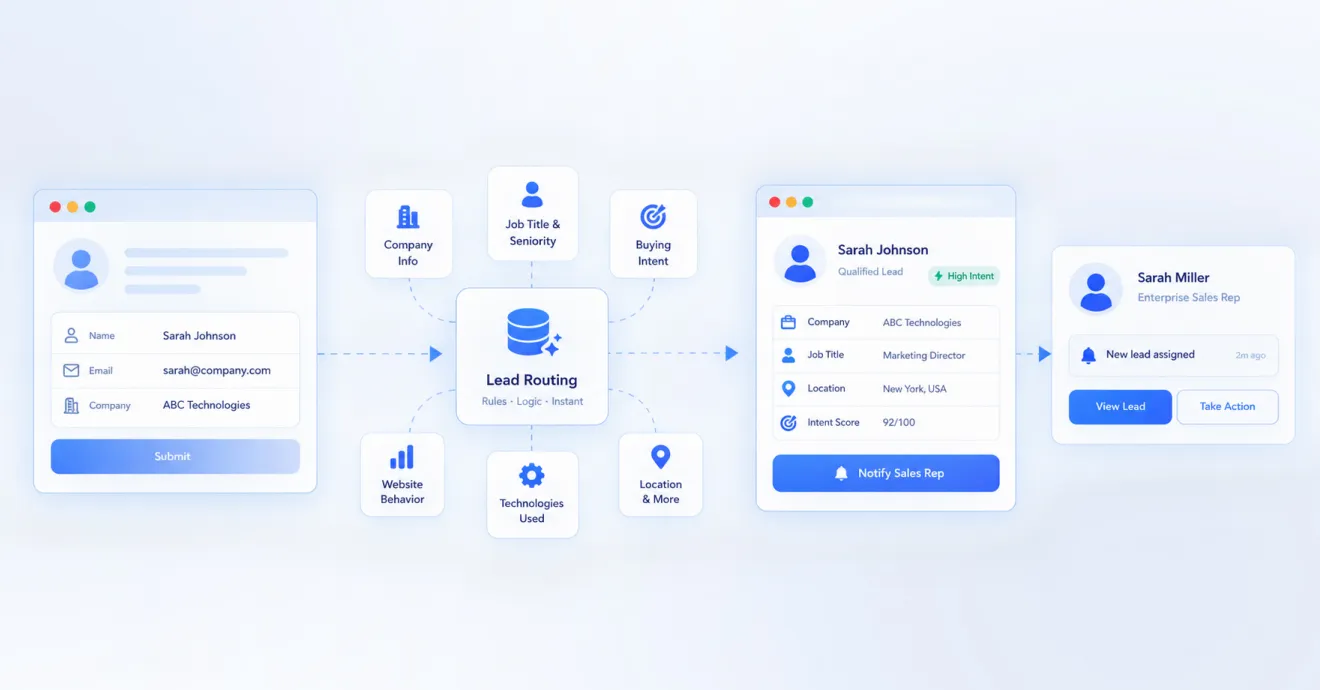
The Enterprise Guide to Hiring an AI Automation Partner (Without Wasting 6 Months)
Choosing the wrong vendor is the single biggest reason enterprise AI automation projects stall, blow past budget, or quietly die...

A great lead that sits in an inbox for six hours is barely better than no lead at all. Here’s a simple, practical guide to automated lead routing: what it is, why speed matters more than almost anything else in sales, and how to actually set it up.
Picture this. A lead fills out your contact form at 4:47 pm on a Tuesday. It lands in a shared inbox. Nobody’s watching that inbox closely right now; everyone’s wrapping up other calls. The lead finally gets picked up the next morning, around 10 am. By then, they’ve already booked a call with two of your competitors.
This isn’t a “sales team isn’t trying hard enough” problem. It’s a plumbing problem. The lead had nowhere fast to go. This is exactly what automated lead routing fixes, and it’s one of the highest-leverage, lowest-cost changes a sales team can make.
Let’s break down what it actually is, why it matters so much, and how to set it up properly even if you’re a small team without a big ops department.
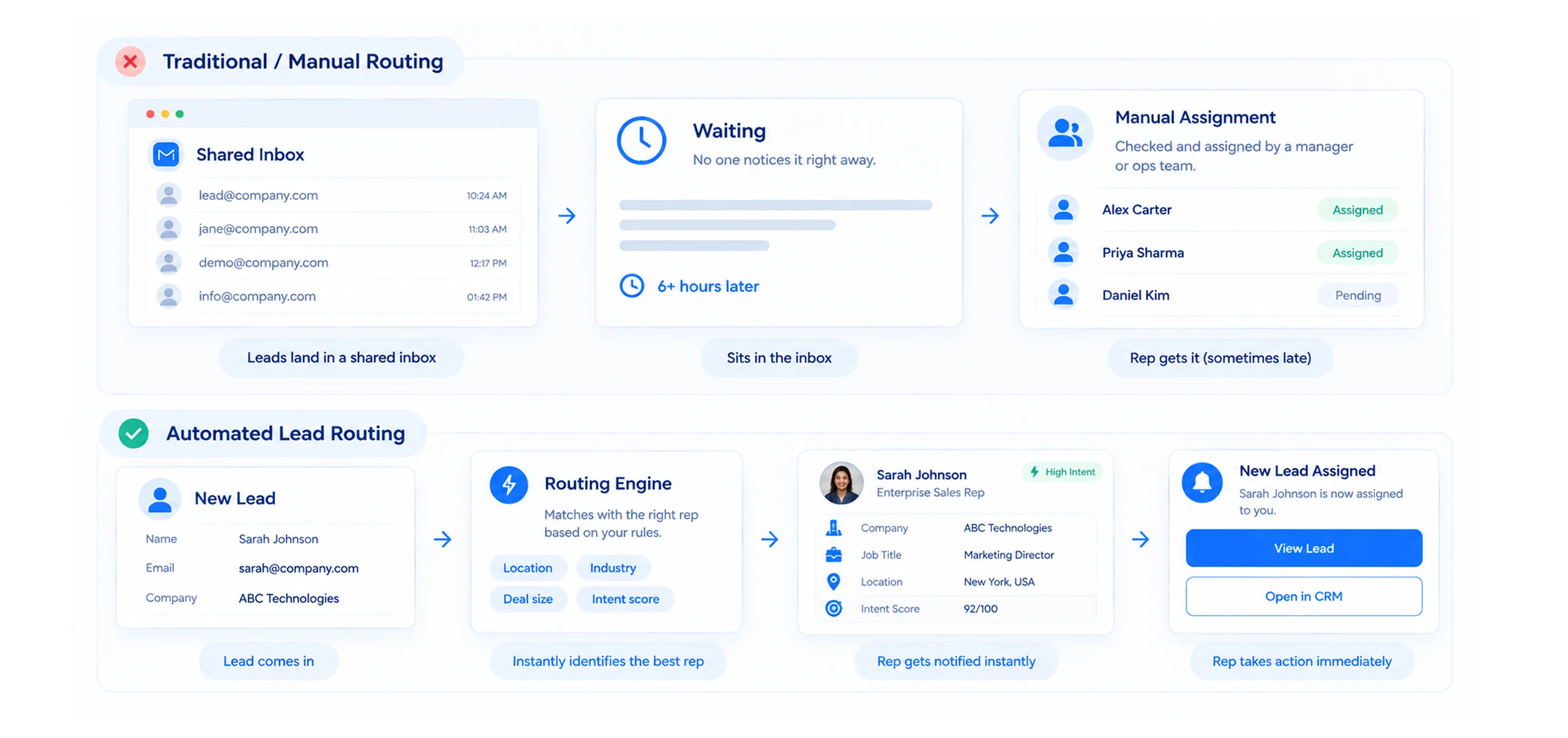
Lead routing is the set of rules that decide which rep gets which lead, and how fast that handoff happens. “Automated” just means a computer applies those rules instantly, instead of a human manually reading through a list and assigning leads by hand.
Without automation, most teams do one of two things, both of them slow:
Automated routing replaces both of these with rules that fire the moment a lead comes in: no manual checking, no waiting for someone to be free, no leads sitting untouched over a lunch break.
| Simple way to think about it: Routing is the difference between a lead landing on someone’s desk versus a lead landing in a pile that someone will get to eventually. Automation guarantees the first one, every single time. |
Of everything you could optimize in your sales process, response time is one of the few that has been studied over and over, with remarkably consistent results: leads contacted within the first five minutes convert dramatically better than leads contacted even 30 minutes later. Wait a full hour, and your odds drop even further. Wait until the next day, and in many cases, you’ve already lost the deal to whoever responded first.
Here’s why this happens. When someone submits a form, they’re in an active, curious, decision-making mindset. That window doesn’t stay open forever. The moment they close your tab, they move on to the next task, the next tab, the next competitor. By the time you reach out hours later, that window has usually closed, and you’re now interrupting them instead of continuing a conversation they were already having.
Speed doesn’t just win more deals; it changes what a rep can say
There’s a psychological angle here too. A rep who calls within five minutes can say, “I saw you were just looking at our pricing page.” A rep calling the next day has to say, “Hi, following up on your form from yesterday.” The first one feels attentive. The second one feels like a queue. Same rep, same product, completely different first impression.
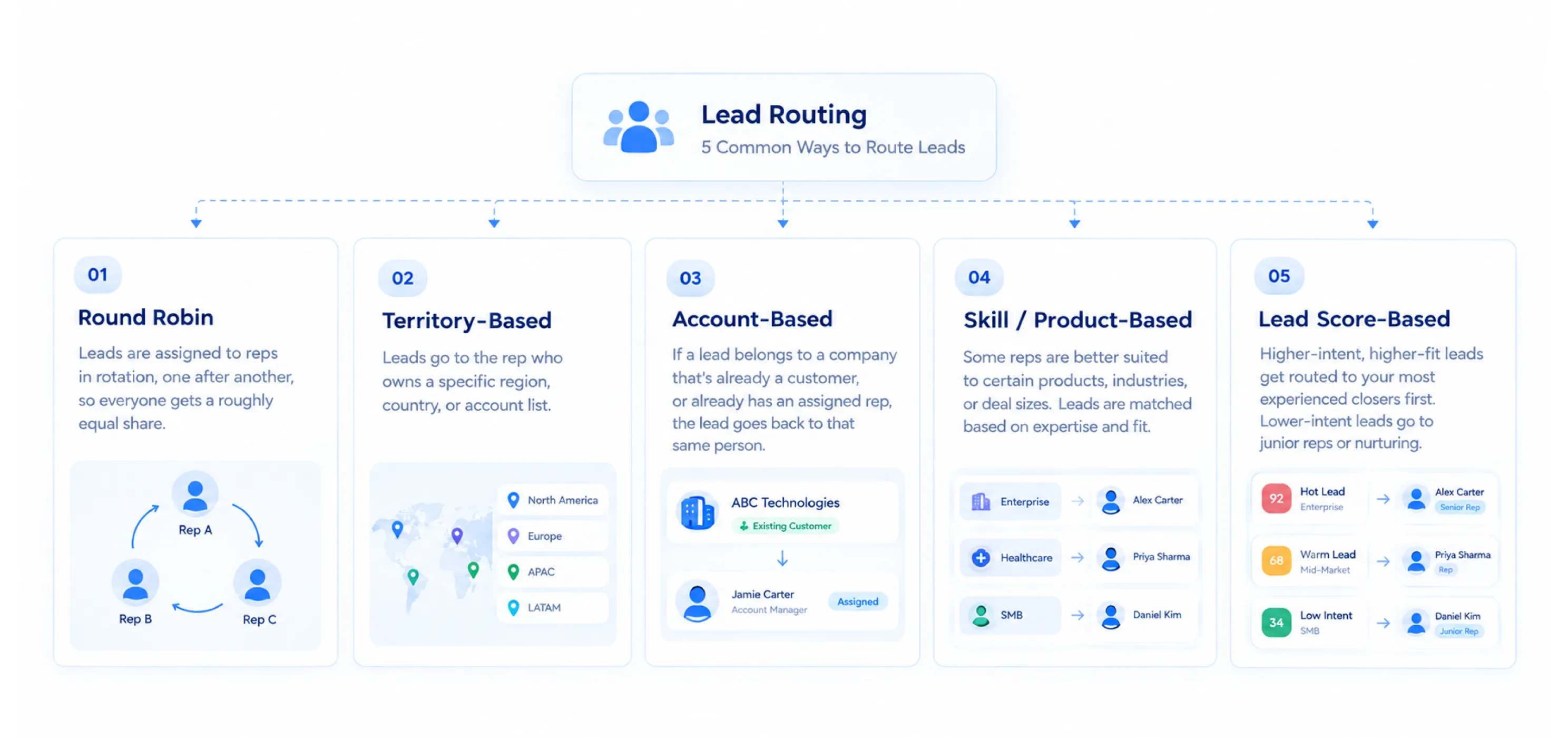
There’s no single “correct” way to route leads, the right method depends on your team size, your product, and how your reps are organized. Here are the main approaches, in order of how commonly they’re used.
Round robin
Leads are assigned to reps in rotation, one after another, so everyone gets a roughly equal share. Simple, fair, and easy to explain. Works best when your reps are largely interchangeable — similar skill level, similar territory, similar product knowledge.
Territory-based routing
Leads go to the rep who owns a specific region, country, or account list. Common in field sales and enterprise teams where relationships and local knowledge matter.
Account-based routing
If a lead belongs to a company that’s already a customer, or already has an assigned rep, the lead should always go back to that same person. Nothing frustrates a customer more than being treated like a stranger by a brand-new rep.
Skill or product-based routing
Some reps are simply better suited to certain products, industries, or deal sizes. A lead asking detailed technical questions about your enterprise plan probably shouldn’t land with a rep who only handles small self-serve accounts.
Lead score-based routing
Higher-intent, higher-fit leads get routed to your most experienced closers first. Lower-intent or early-stage leads might go into a nurture sequence instead of straight to a rep’s calendar.
| Routing method | Best for |
| Round robin | Small teams, interchangeable reps, fair distribution |
| Territory-based | Field sales, regional or country-specific teams |
| Account-based | Teams with existing customers and named account owners |
| Skill/product-based | Teams selling multiple products or serving varied industries |
| Lead score-based | Teams that want senior reps focused on the hottest leads |
Most mature teams don’t use just one of these, they layer them. For example: check for an existing account owner first, then check territory, then fall back to round robin among available reps in that territory.
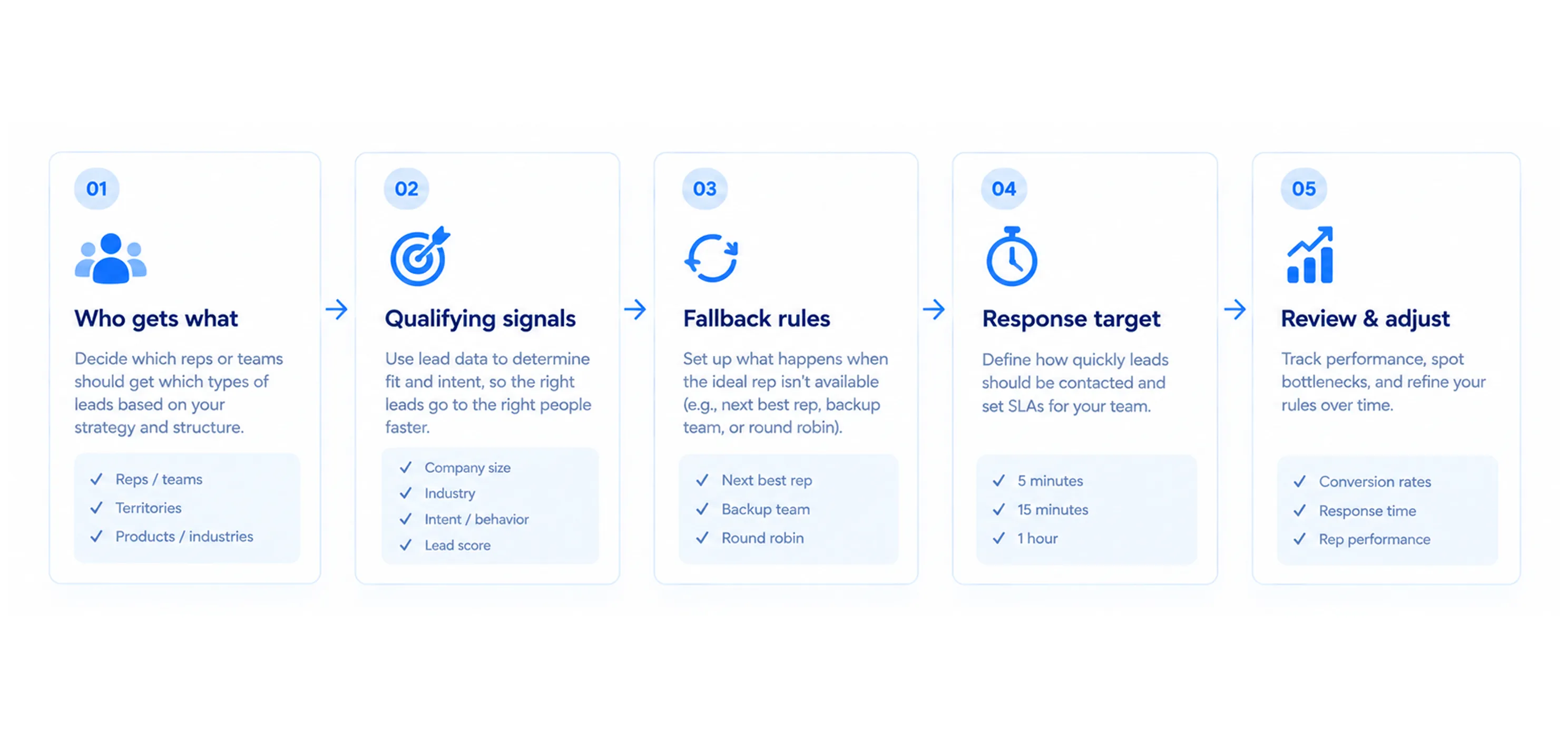
You don’t need to get this perfect on day one. Start simple, watch how it performs, and add complexity only when you actually need it.
Step 1: List out who gets what
Write down, in plain language, how you’d want a lead handled if you were sorting it yourself. “Enterprise leads go to Priya and Arjun. Everyone else goes round robin between the rest of the team.” That sentence is basically your first routing rule.
Step 2: Decide your qualifying signals
Figure out what actually separates one type of lead from another for your business, company size, deal size, industry, region, product interest, or a lead score. These become the “if this, then that” conditions your routing rules will use.
Step 3: Set your fallback rules
What happens when the “right” rep is unavailable, out sick, or already has five leads sitting untouched? Always have a backup path so a lead never simply sits waiting for one specific person to become free.
Step 4: Set a response-time target, and alert on it
Decide on a target, five minutes is a strong benchmark for inbound leads, and set up an alert if a lead goes unanswered past that window, so it escalates instead of quietly aging in someone’s queue.
Step 5: Review and adjust monthly
Routing rules aren’t a “set once” thing. Revisit them every month or so as your team grows, as territories shift, or as you notice certain reps are overloaded while others are underutilized.
Routing based on stale data
If your rep list, territories, or account ownership records aren’t kept up to date, your routing rules will confidently send leads to the wrong place. Automation doesn’t fix bad data — it just executes on it faster.
No fallback for unavailable reps
If a lead is assigned to a specific rep and that rep is on leave, in back-to-back meetings, or simply slow to check notifications, the lead just sits there. Always build in a timeout and a reassignment path.
Treating every lead the same
Not every lead deserves the same urgency. Routing everything through one identical process means your best, most ready-to-buy leads get the same treatment as someone who just downloaded a free guide out of curiosity.
Routing to a person, but not actually alerting them
A lead sitting unopened in someone’s CRM queue is barely different from a lead sitting in a shared inbox. Routing needs to come with a real notification, email, Slack, SMS, whatever gets seen fastest by your team.
| Quick self-check: if a hot lead came in right now, would a specific rep get notified within seconds? If you’re not sure, that’s the first thing to fix, before worrying about anything more advanced. |
Fast is good. Fast and right is much better. A lead that gets a reply in ninety seconds, but lands with a rep who doesn’t understand their industry or can’t answer their specific question, still creates a bad first impression.
This is why good routing setups usually combine two things: getting a lead to a human quickly, and getting them to the right human. Sometimes those two goals pull in different directions, the fastest available rep isn’t always the best-fit rep. Good routing rules find the best balance for your business, rather than optimizing for just one of the two.
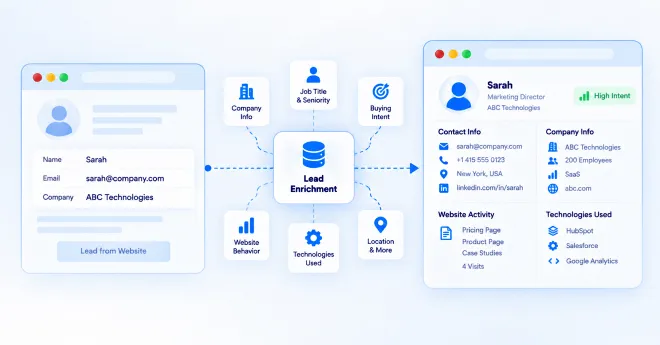
Routing decides where a lead goes. But there’s a step before that which matters just as much, making sure the lead is actually worth a rep’s time in the first place, and arrives with enough context that the rep doesn’t start the conversation blind.
This is where a lot of teams still have a gap. A form submission usually hands a rep just a name and an email. No context about what the visitor was actually interested in, what page they came from, or what question prompted them to reach out. The rep has to start from zero, which slows everything down right at the moment speed matters most.
This is exactly where a tool like Corvexa becomes useful alongside your routing setup. Corvexa is an AI sales agent that sits on your website, engages visitors the moment it spots real buying intent, and has an actual conversation with them instead of just collecting a name and an email through a static form.
What lands in your inbox or CRM isn’t just contact details; it’s a full picture: an intent score (High, Medium, or Low), what the visitor was interested in, the page they came from, and a summary of the conversation itself. That context is exactly what a rep needs to respond fast and respond well, instead of opening a blank lead and guessing where to start.
A few ways this connects directly to routing:
In short: routing gets leads to the right rep fast. A tool like Corvexa makes sure that when a lead does reach a rep, it’s not a cold, empty form entry it’s a warm conversation with real context already attached.
Automated lead routing isn’t a flashy feature; it’s plumbing. But plumbing is exactly the kind of thing that quietly costs you deals when it’s broken, and quietly wins you deals when it’s fixed.
If you only do three things after reading this, make it these:
Fix these three, and most teams see a real, measurable jump in lead-to-customer conversion, not because they’re working harder, but because leads are finally reaching the right person while they’re still interested.

 Automated Lead Routing: Getting Leads to Reps Faster
Choosing the wrong vendor is the single biggest reason enterprise AI automation projects stall, blow past budget, or quietly die...

B2B customer acquisition gets harder as a business grows. More website visitors, more leads, more conversations, and more follow-ups can...
A website visitor can leave behind very little information. They may read a few pages, check your pricing, download a...