
 11 Mins Read
The Enterprise Guide to Hiring an AI Automation Partner (Without Wasting 6 Months)
Choosing the wrong vendor is the single biggest reason enterprise AI automation projects stall, blow past budget, or quietly die...

In this guide, we’ll look at how to capture B2B leads automatically from global traffic, including how to engage visitors across time zones, identify buying intent, qualify prospects, capture their details naturally, route leads to the right place, and build a system that keeps working even when your sales team is offline.
The goal isn’t simply to collect more email addresses. It’s to make sure fewer high-intent visitors leave without taking the next step.
Your website might be getting visitors from the US, UK, Germany, India, Singapore, Australia, and dozens of other countries. But here’s the uncomfortable question: What happens when a potential buyer visits your website at 2:00 AM your time?
If they see a contact form, look around, don’t find an immediate answer, and leave, that visitor may never come back.
This is especially important for B2B companies selling globally. Your website doesn’t align with your sales team’s office hours. Visitors can arrive at any time, from anywhere, with different questions, different buying intent, and different expectations.
Imagine your company is based in India. Your sales team works from 10 AM to 7 PM IST. But your website traffic looks something like this:
| Visitor | Local time | What they’re doing |
|---|---|---|
| India | 3:00 PM | Researching solutions |
| UK | 10:30 AM | Comparing vendors |
| US | 2:00 AM | Researching after work |
| Australia | 7:00 PM | Evaluating options |
| Singapore | 5:30 PM | Looking for pricing |
Your website doesn’t close at 7 PM. So why should your lead capture process? This is one of the biggest advantages of having an automated system on a B2B website: It can respond when your team can’t.
A traditional B2B website often works like this: Visitor → Website → Contact form → Submit → Wait → Sales responds
That can work when the visitor is already determined to contact you. But what about someone who has a question before they’re ready?
For example: “Does this integrate with Salesforce?”
They may not want to fill out a form just to ask that.
Or: “Do you work with companies in the UK?”
Again, that’s a question. Not necessarily a form submission.
And: “Can I see a demo tomorrow?”
That’s different. That’s a buying signal. A good automated lead capture system needs to understand the difference.
It doesn’t mean showing a AI chatbot to every visitor and asking: “What’s your email?” That’s just a digital version of a form.
Automatic B2B lead capture should ideally happen across several stages: Engage → Understand → Qualify → Capture → Route → Follow up
The important part is that the visitor doesn’t have to figure out your sales process themselves. The system helps them move through it.
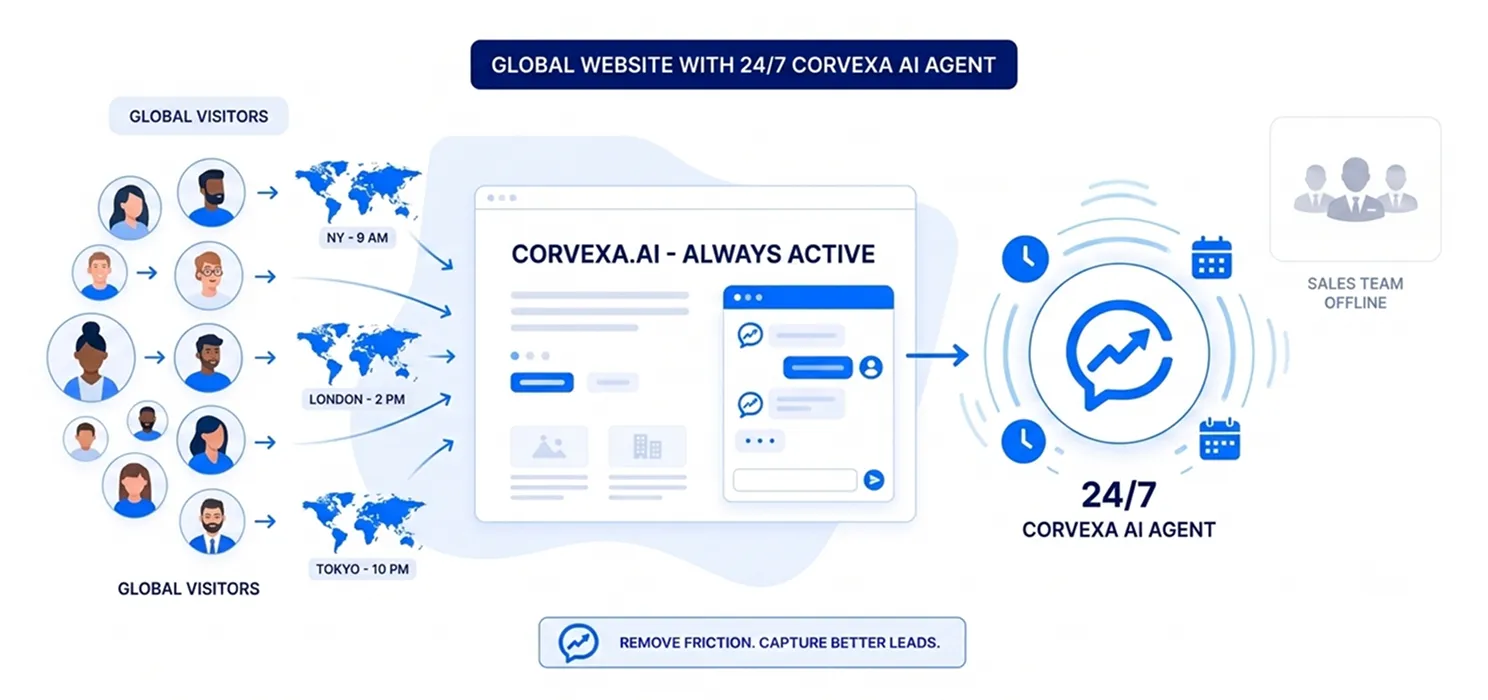
The first requirement is simple. Your website needs to engage visitors even when your sales team isn’t available. This doesn’t mean someone from sales needs to sit in front of a computer all night. An AI agent can handle the initial interaction.
For example:
Visitor: “Hi, I’m looking for a lead generation solution for our SaaS company.”
AI: “Sure. Are you mainly trying to increase the number of leads you’re capturing, or improve the quality of the leads reaching your sales team?”
The visitor gets an immediate response. No “We’ll get back to you.” And no requirement to start with a long form.

This is one of the most important principles of automated lead capture. Help first. Capture second.
Think about your own buying behavior. If you visit a website and immediately see:
Name
Email
Phone
Company
Job title
Message
you might think: “Why should I give you all this information? I just have a question.”
But if the website answers your question first, the interaction feels different.
For example:
Visitor: “Does this work with Salesforce?”
AI: “Yes. It can connect with Salesforce so qualified leads can flow into your existing sales workflow. Are you currently using Salesforce for inbound leads?”
Now the conversation has started. The visitor is talking. The system is learning. And qualification can happen naturally.

Global traffic isn’t one audience. A visitor from Germany may have different questions from a visitor in the US.
A visitor from India might be looking for implementation information. A visitor from the UK might want to understand pricing. A visitor from Australia might want to know whether support is available in their time zone.
You don’t necessarily need completely different website chatbots for lead generation for every country. But you should make sure your system can use context.
Useful signals can include:
This creates a much better picture of the visitor.

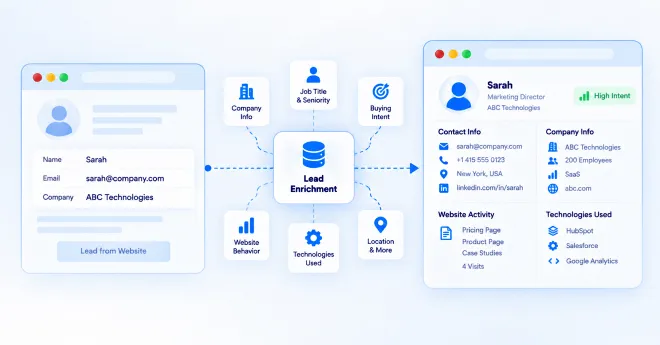
This is where automated B2B lead capture becomes much more valuable. A name and email address tell you who someone is. A conversation can tell you why they’re there.
Compare these two leads:
Lead A
Name: John
Email: [email protected]
That’s all you know.
Lead B
Name: Sarah
Company: 200 employees
Industry: SaaS
Problem: Inbound leads aren’t being qualified quickly enough
Timeline: This quarter
Interest: Wants a demo
Which one would your sales team rather call? Obviously, Lead B. That’s why the goal should be qualified lead capture, not simply lead capture.

Your AI agent needs some direction. Otherwise, it may treat every visitor equally. Start with your ideal customer profile.
Ask: Who do we want?
What problem do they have?
What indicates buying intent?
Who isn’t a fit?
These rules help the AI focus on sales relevance, not just conversation volume.

Once a visitor shows genuine interest, ask for the information needed to continue. For example: “It sounds like you’re looking to solve this within the next few months. Would you like me to connect you with someone from our team?” If they say yes: “Sure. What’s the best business email for you?” That’s a much more natural exchange than: “Please fill out these seven mandatory fields.” The visitor understands why you’re asking. That matters.

Not every lead deserves the same response time. Imagine someone says: “We’re evaluating three vendors and want to make a decision this month. Can I speak with someone today?”
That should not sit in a general inbox. Your system should make the urgency visible. A simple scoring model might look like:
| Signal | Example | Priority |
|---|---|---|
| Demo request | “Can I book a demo? | High |
| Buying timeline | Need this this month” | High |
| Pricing discussion | “What’s your enterprise pricing?” | High |
| Product research | “How does it work?” | Medium |
| General question | “What is this?” | Low |
The exact scoring model depends on your business. The principle is simple: Let sales see buying intent, not just contact details.

Automation becomes much more useful when it doesn’t create another dashboard your sales team has to remember to check. Your lead capture system should ideally connect with your existing workflow.
For example:
AI agent → HubSpot
or
AI agent → Salesforce
or
AI agent → Email notification
or
AI agent → Calendly
The goal is simple: The lead should go where your team already works.

A returning visitor is often more interesting than a completely new visitor. Why? Because they have already shown some level of interest.
They might have:
If your system can recognize relevant conversation context, you can make the next interaction more useful. Instead of starting from: “How can I help?” the experience can move toward the visitor’s actual need. Even when full personalization isn’t available, the pages they’re visiting can provide useful context.

Your blog shouldn’t only attract traffic. It can also help qualify that traffic. For example, someone searches for: “AI lead capture for B2B” They read your article. Then they ask: “How does this work with HubSpot?”
That’s a much stronger signal than simply knowing they visited a blog. Your content attracted them. The conversation helped you understand them. The AI agent can bridge the gap between SEO traffic and sales conversation.

How Corvexa can automate global B2B lead capture
Corvexa is designed around a simple idea: Your website visitors are already showing intent. Your job is to recognize it and act on it.
Instead of relying only on static forms, Corvexa can engage visitors in conversations, answer questions using your business knowledge, qualify leads and move high-intent prospects toward the next step.
It can learn from your website
Corvexa can crawl selected website pages and use your products, pricing, FAQs and other content as knowledge.
You can also add additional information and upload PDFs.
It can qualify visitors
You define the characteristics of your ideal customer, including industries, company sizes, pain points and disqualifiers.
It can capture lead details
During the conversation, it can collect information such as name, email, phone, interest and preferred follow-up time.
It can identify high-intent signals
Hot keywords and qualification criteria can help surface visitors who are ready to talk.
It can involve your team
Your sales team can monitor conversations and take over when a human conversation is more appropriate.
It can connect with your workflow
Corvexa supports integrations such as HubSpot, Salesforce, Calendly and email, while also providing its own lead and conversation dashboard.

This is ultimately the biggest reason to automate. Your website doesn’t stop receiving traffic when your office closes. A visitor from New York doesn’t care that it’s 2:30 AM in your office. A prospect in London doesn’t care that your sales team is on lunch. A buyer in Singapore doesn’t want to wait until tomorrow to ask a simple question. Intent doesn’t follow your working hours. Your lead capture system shouldn’t have to either.
This distinction matters. The best B2B lead capture systems aren’t trying to remove people from the sales process. They’re trying to make sure humans spend their time on the right conversations.
AI can handle:
Humans can handle:
Think of AI as the first layer of your sales team. Not the entire sales team.

If you’re starting from scratch, don’t automate everything.
Start here:
Let visitors get immediate answers.
Identify who is actually worth a sales conversation.
Collect details naturally during relevant conversations.
Separate high-intent prospects from casual visitors.
Alert your team when a valuable opportunity appears.
Let qualified prospects schedule directly.
Remove manual copying and pasting.
Getting traffic from around the world is great. But traffic by itself doesn’t create revenue.
A visitor has to move from: “I’m researching.”
to: “This might solve my problem.”
to:“I’d like to know more.”
to: “Let’s talk.”
Your website has an opportunity to help that process happen. And automation makes it possible to do that even when your sales team isn’t online. The goal isn’t to turn every visitor into a lead. It’s to make sure the visitors who are ready to talk don’t leave simply because nobody was there to answer. That’s what automated B2B lead capture should really be about.

 How to Capture B2B Leads Automatically from Global Traffic
Choosing the wrong vendor is the single biggest reason enterprise AI automation projects stall, blow past budget, or quietly die...
B2B customer acquisition gets harder as a business grows. More website visitors, more leads, more conversations, and more follow-ups can...
A website visitor can leave behind very little information. They may read a few pages, check your pricing, download a...