
 7 Mins Read
Automated Lead Routing: Getting Leads to Reps Faster
A great lead that sits in an inbox for six hours is barely better than no lead at all. Here’s...

| Quick summary Contact forms convert views into submissions at only around 9%, one of the lowest rates of any form on your site. This guide covers the 7 most common reasons contact forms quietly lose leads, from too many fields to no confirmation after submission, and a practical fix for each one. |
Your contact form is supposed to be the finish line. A visitor made it through your whole site, decided you might be worth talking to, and clicked through to say so. Then, most of the time, they leave without submitting anything.
That is not bad luck. Contact forms have some of the lowest completion rates of any form type online, and the reasons are almost always fixable in an afternoon, not a redesign. Here are the seven that show up most often.
Before the list, the scale of the problem is worth seeing. Data from Zuko, reported byCueFully, shows that 55% of people who view any form never complete it, and contact forms specifically convert views into submissions at only about 9%. Almost every visitor who opens your form leaves without sending it.

1. It asks for too much, too soon
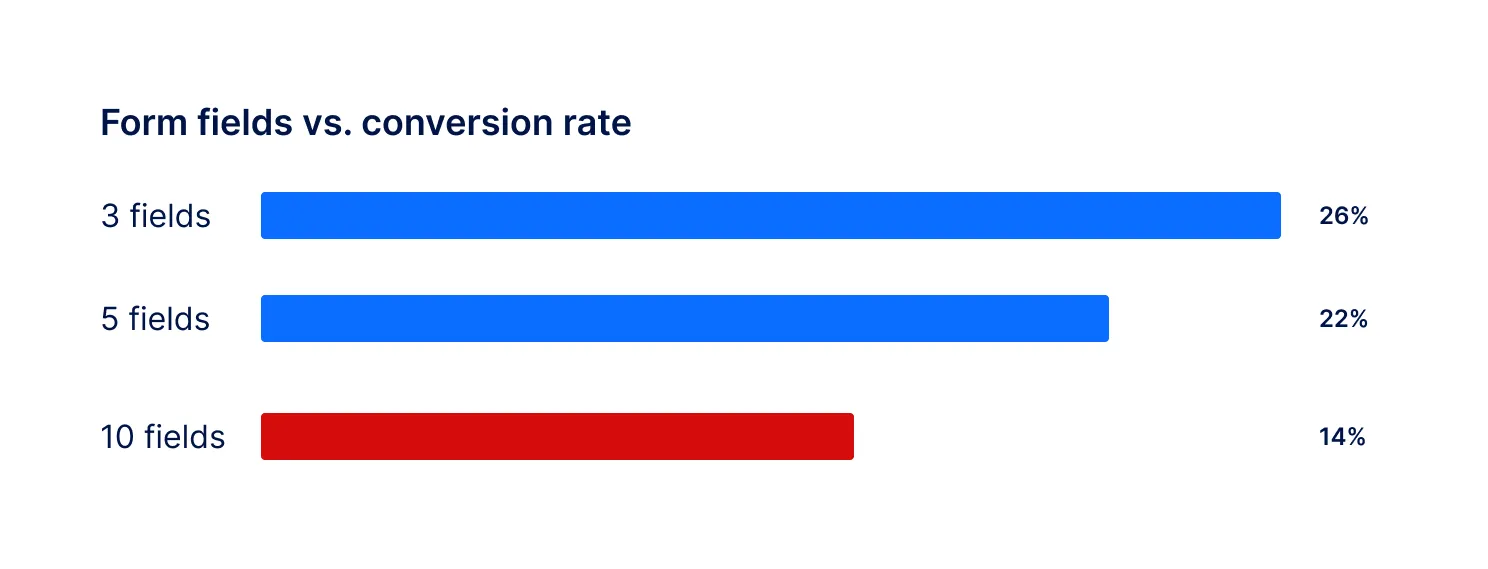
Every extra field is another reason to close the tab. A widely cited analysis found that reducing form fields from 11 down to 4 boosted conversions by around 120%, and HubSpot’s own research found that dropping a form from 4 fields to 3 improved completion by nearly 50%.
Fix: Ask only for what you need to start a conversation, usually name, email, and one qualifying question. Save the rest for a follow-up call.
2. It’s hard to use on a phone
Small tap targets, no autofill, and fields that force the visitor to zoom in all add friction that a desktop test will never catch. Most B2B traffic now arrives on mobile at some point in the buying journey, and a form built only for a mouse loses those visitors first.
Fix: Test the form on an actual phone, not just a resized browser window. Use large tap targets, native input types, and autofill-friendly field names.
3. The submit button doesn’t say what happens next
A button labeled “Submit” tells the visitor nothing. Will someone call them? Email them? Today, or next week? Uncertainty at the last click is enough to make a hesitant visitor close the tab instead.
Fix: Replace generic labels with something specific, like “Get My Quote” or “Talk to Sales”, and add one short line underneath about what happens after they click it.
4. Errors don’t explain what’s wrong
A red outline with no message forces the visitor to guess. Was the email invalid? Was a field skipped? Each guess costs another few seconds of patience, and patience for filling out a form is already in short supply.
Fix: Validate fields as the visitor types, and write error messages in plain language, like “Please include an @ in your email” instead of “Invalid input.”
5. There’s no reason given for the questions being asked
A field asking for company size or budget, with no context, can feel invasive rather than helpful. Visitors are more willing to share information when they understand why it matters to them, not just to you.
Fix: Add a short line next to sensitive fields explaining the benefit, such as “So we can recommend the right plan,” rather than leaving the field to speak for itself.
6. Nothing happens after they hit submit
A blank page, a generic “Thank you,” or worse, no confirmation at all, leaves the visitor unsure if it even worked. Some will submit a second time. Others will assume it failed and give up. Harvard Business Review found that leads contacted within an hour werenearly seven times as likely to qualify, but a silent confirmation screen wastes that early moment of intent before follow-up even begins.
Fix: Show an immediate, specific confirmation, send a follow-up email right away, and set a target response time your team actually hits.
7. It’s the only way to reach you
Some visitors are ready to fill in a form. Others want a quick answer before they commit to anything at all, and a form with no lighter alternative simply loses them.
Fix: Keep the form, and add a faster option alongside it, like live chat, for visitors who want to ask one question before they hand over their details.
| What you’re seeing | Likely reason | Where to start |
|---|---|---|
| Lots of views, almost no submits | Too many fields, or unclear purpose | Cut fields to the essentials |
| Drop-off specifically on mobile | Poor mobile layout | Test and rebuild for touch |
| Visitors start, then abandon mid-form | Confusing errors or too many steps | Add inline validation, group fields |
| Submits happen, but leads go cold | Slow or missing follow-up | Confirm instantly, respond within the hour |
| High-intent pages, low form use at all | No lighter alternative to a form | Add chat alongside the form |
| Did you know? A form is often the very last thing a visitor sees before deciding whether you were worth the effort. Every reason above adds friction at the exact moment friction is most costly. |

A chatbot is not a replacement for your contact form, it is a second door for visitors who are not ready to walk through the first one. Corvexa sits next to your existing form, answers questions instantly, and captures name, email, phone and interest inside a normal conversation instead of a list of fields.

Your contact form is probably losing more leads than it captures, and the reasons are rarely mysterious. Too many fields, a rough mobile experience, an unclear button, confusing errors, no explanation, no confirmation, and no alternative all quietly push visitors away at the exact moment they were ready to reach out.
Fix what you can on the form itself, then give visitors who want something faster a way to start talking right away. Corvexa sits alongside your existing form to catch exactly those visitors. Plans start at $39 a month. Seepricing.

FAQ
Find answers to common questions about contact form conversion rates, form optimization, lead generation, and using Corvexa alongside your existing contact form.
The most common causes are too many required fields, a poor mobile experience, an unclear submit button, confusing error messages, no explanation of what happens next, and no confirmation after the visitor submits.
Research on form performance generally finds 3 to 5 fields converts best. Cutting a form from 11 fields down to 4 has been shown to boost conversions by around 120%, and dropping from 4 fields to 3 has improved completion by nearly 50% in HubSpot’s own testing.
Contact forms typically convert views into submissions at only around 9%, one of the lowest rates of any form type. A well-optimized short form can reach into the 20 to 26% range.
Not replace, add alongside. Some visitors prefer a form. Others want a quick answer before they commit to anything. Offering both usually captures more leads than either one alone.
Ideally, an immediate on-screen confirmation, a follow-up email, and a fast human or automated response. Leads contacted within an hour are far more likely to convert than leads left waiting.
Installation is a single script tag. Corvexa can go live within 48 hours of your onboarding call, and plans start at $39 a month.
 7 Reasons Your Contact Form Is Losing Leads and How to Fix Them
A great lead that sits in an inbox for six hours is barely better than no lead at all. Here’s...

In this guide, we’ll look at five practical, real-time strategies to capture more B2B leads from responding while intent is...

Quick summary: People who need a lawyer often search late at night and contact the first firm that answers. This...