
 10 Mins Read
AI Chatbot vs Live Chat: Which Is Better for Website Lead Generation?
Quick summary Should you put a person or an AI behind your website chat? This guide compares AI chatbot vs....

| Quick summary SaaS buyers research a lot and talk to sales late. An AI chatbot for SaaS websites can meet them while they research, answer product questions, spot buying intent, and hand your team a scored lead. This guide covers how it works, where to place it, what to train it on, and how to measure results. |
Picture a visitor on your SaaS website. She reads your integrations page, then your pricing, then a comparison with a rival. Twelve minutes later she closes the tab.
No form filled. No email captured. Your analytics call it a “bounce,” but she was the most interested person you had all week.
This is the everyday problem an AI chatbot for SaaS websites is built to fix. Let’s look at how it works and how to set it up well.
Because SaaS buyers do their homework first. They read your site, check reviews, and compare options long before they talk to anyone. And now they often start with AI.
G2 surveyed 1,076 B2B software buyers in March 2026. It found that 51% now start research with an AI chatbot more often than with Google, up from 29% the year before. It also found that 69% ended up choosing a different vendor than they first planned, based on chatbot guidance.
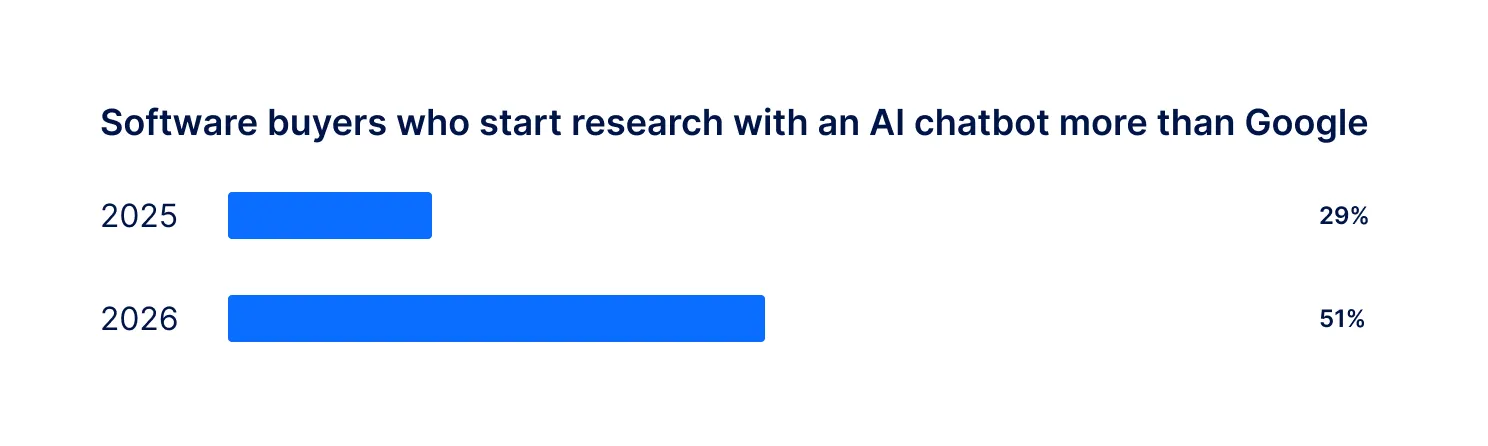
The lesson is simple. Buyers arrive on your site already half-informed. They want fast, specific answers, not a long form and a callback next week.
Website conversion is often low
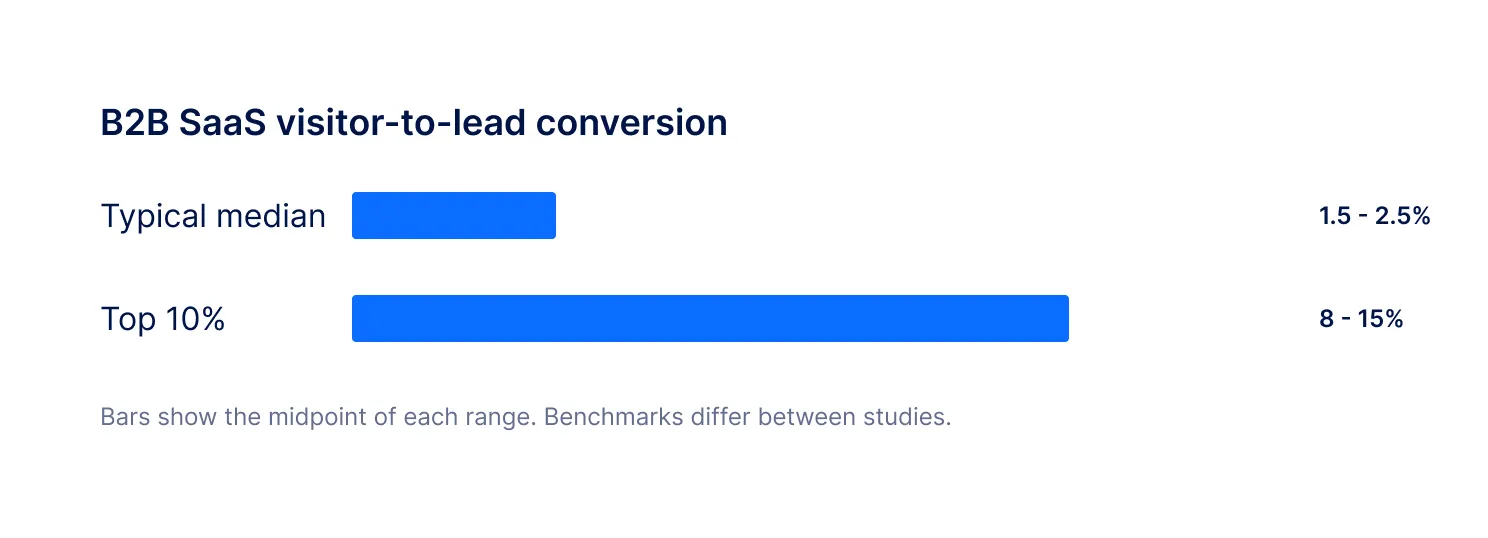
SaaSHero reports that the median B2B SaaS visitor-to-lead rate typically sits between 1.5% and 2.5%, while top performers reach 8% to 15%. Figures vary by source, but the gap is clear.
| Did you know? G2 also found that evaluation is now the longest stage of the journey for 40% of software buyers. Long evaluations mean many questions, and a chatbot can answer them at any hour. Source: G2 2026 Buyer Behavior Report. |
An AI chatbot for SaaS websites is software that chats with visitors about your product, answers questions from your own content, qualifies them and captures their contact details, so your team only follows up with ready buyers.
You may see it called a SaaS AI chatbot, a chatbot for SaaS websites or a SaaS lead generation chatbot. The best ones do more than answer questions. They watch intent, ask smart follow-ups and score each lead.
How is it different from a support chatbot?
A support bot resolves problems for existing users. A sales-focused SaaS AI chatbot works on your marketing site and helps prospects. It cares about fit and readiness, not tickets.
Here is the path one visitor takes.
A visitor opens pricing or an integrations page. The chatbot offers help at a natural moment.
It uses your docs, pricing and FAQs, so answers about features, security and setup are accurate.
Questions about seats, timelines and tools show how serious and how suitable the visitor is.
Name, work email, phone, interest and best follow-up time are collected without a form.
High, Medium or Low. Hot leads trigger an alert, and everything syncs to your CRM.
Not every page deserves the same behavior. Here is a simple guide for a chatbot for SaaS websites.
| Page | What the visitor wants | What the chatbot should do |
|---|---|---|
| Pricing | Cost and plan fit | Answer, ask about team size, offer a demo |
| Integrations | Checking technical fit | Confirm tools, ask which CRM or stack they use |
| Comparison or alternatives | Choosing between vendors | Handle objections, capture details early |
| Security or docs | Approval or setup details | Answer from docs, flag larger accounts |
| Blog | Learning | Stay light, offer useful next steps |
| Tip Start with two pages: pricing and your main product page. Learn from real chats, then expand. It is easier to improve a small setup than a big one. |
Qualifying means learning enough to know who to call first. A good SaaS lead generation chatbot looks for a handful of signals.
Fit signals
Company size, industry, role and the tools they already use. A 300-person company asking about SSO looks different from a solo founder browsing.
Intent signals
Questions about pricing for a set number of seats, phrases like “book a demo,” and requests for a security review all suggest readiness.
Timing signals
“We need this live next quarter” is a stronger signal than “just looking.” Timing often decides who gets the meeting.
Here is what that looks like in a real chat.
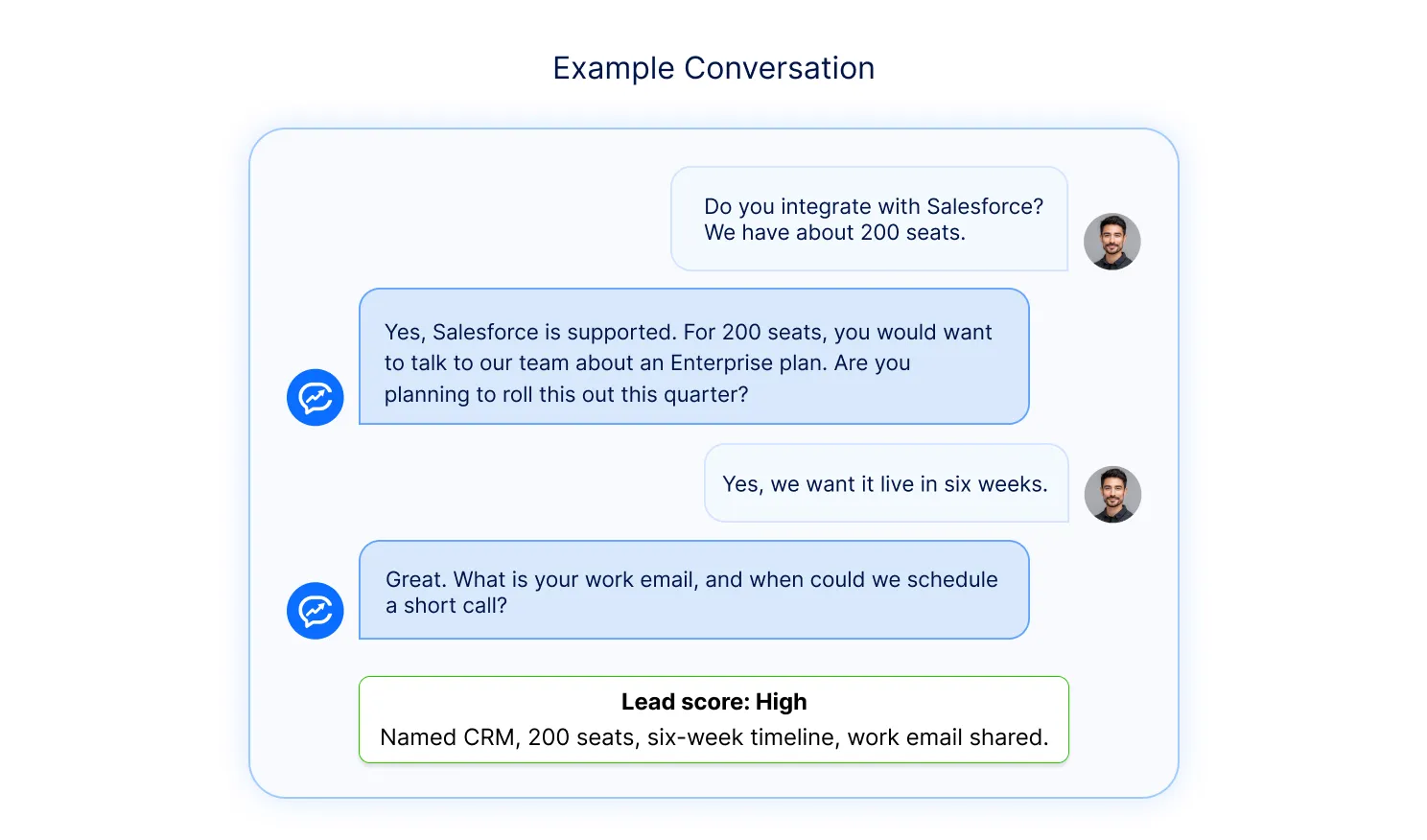
In four messages, the chatbot learned the tool, the size, the timeline and the contact. Your sales rep starts the call knowing all of it.
SaaS companies sell in different ways, and the chatbot should match yours.
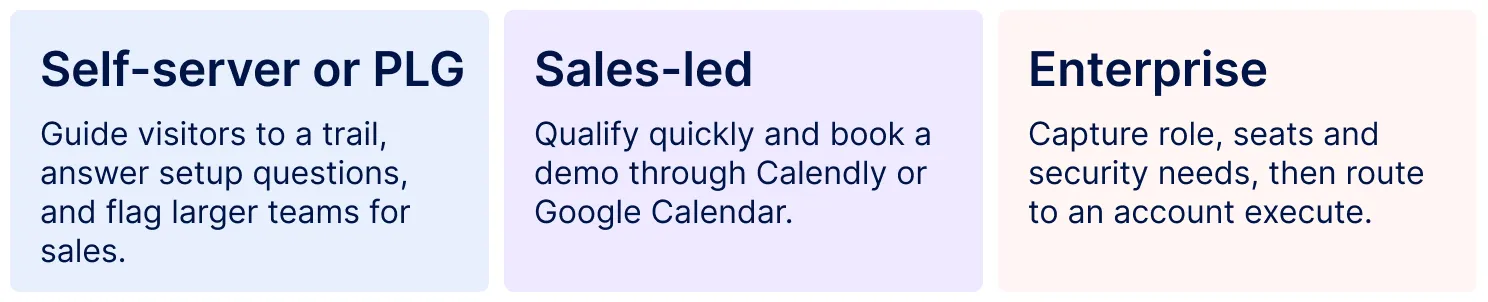
Most SaaS teams mix these. A visitor from a small company may get a trial link. A visitor from a large account should get a human conversation quickly.
The chatbot is only as good as what it knows. Feed it what your best salesperson knows.
Your website and docs
Let it crawl product pages, pricing, integrations, and help articles. You can turn pages on or off, so it never learns from outdated content.
Private knowledge and PDFs
Add security whitepapers, spec sheets, and internal FAQs. Corvexa’s knowledgebase and PDF upload turn these into answers.
Your qualification rules
Define your ideal customer, disqualifiers, and hot keywords in the lead qualification profile. Add competitor details so comparison questions are handled well.
You capture visitors who would never fill in a form
A chat feels lighter than a form. Visitors ask a question and share details as part of the answer.
Your team spends time on the right leads
Scores and full chat history mean reps know who is hot and what they asked before the first call.
You cover every time zone
SaaS buyers are global. A chatbot works while your team sleeps and records a preferred follow-up time.
You learn what buyers really want to know
Chat logs show which features, integrations and objections come up most. Use them to improve your pricing page, docs and pitch.
Pricing and plan questions
“What does it cost for 50 users?” is one of the strongest buying signals a SaaS website sees. The chatbot answers, asks a follow-up, and can offer a demo in the same chat.
Competitor comparisons
Buyers compare tools constantly. When a visitor asks how you differ from a rival, the chatbot can answer from your approved comparison content and capture their details while interest is high.
Security and compliance questions
Larger accounts ask about data storage, privacy, and access control early. Answering from your documents builds trust and also flags bigger deals.
Trial and onboarding questions
Visitors often hesitate over setup. Clear answers about time, effort and integrations remove doubts and move them toward a trial or a call.
Returning visitors
Someone who visits pricing three times in a week is telling you something. On Corvexa’s Pro plan, returning visitor recognition lets the chat pick up where it left off.
The chatbot is not a replacement for sales. It is the first conversation. Your team owns the second.
When a lead scores High, an alert goes out by email, and on Pro plans also by Slack. A rep can watch the chat live and click “Take over” to talk to the visitor, then hand it back with “Return to AI.” Roles keep everyone in their lane: Admins manage, Agents chat and Viewers observe. See the chat sessions guide for details.
The result is a smoother handoff. The rep opens with context, such as “I saw you asked about Salesforce and 200 seats,” instead of starting from zero.
At minimum, your CRM and calendar. Corvexa’s AI chatbot integrates with CRMs such as HubSpot, Salesforce, Zoho, GoHighLevel, Calendly, Google Calendar, Slack, and WhatsApp, and sends leads by email if you have no CRM. It installs on WordPress, Webflow, Shopify or any custom site with one script tag.
✔ It detects buying intent, not only keywords in a question.
✔ It learns from your docs, PDFs and custom answers.
✔ It scores leads High, Medium or Low.
✔ Your team can take over a chat with full history.
✔ It syncs with your CRM and calendar.
✔ Pricing stays predictable as traffic grows.
✔ Someone guides your setup, so it is not a generic script.
Treating it like a support bot
If pipeline is the goal, judge success by qualified leads and meetings, not tickets closed.
Training it on outdated pages
Old pricing or retired features will confuse buyers. Re-crawl after changes, and switch off pages you do not want it to use.
Asking for too much too early
Help first, then ask. If a visitor says “book a demo,” go straight to capture.
Hiding that it is AI
Say so upfront. G2 also found that 87% of buyers prefer vendors who are transparent about their AI use over cheaper black-box rivals. Source: G2 2026 Buyer Behavior Report.
Launching and forgetting
Read chats weekly. Fix weak answers and add new hot keywords as your offers change.
Look at outcomes, not chat counts. Track these each month.
Visitor-to-lead rate shows if more visitors become contacts. Qualified leads show real fit. Meetings booked show real movement. Response time to hot leads shows how fast you act. Cost per qualified lead shows efficiency.
The Corvexa leads dashboard shows scores, source pages and chat history, and leads move through Open, 1st Follow-up, 2nd Follow-up, and Closed. In our case studies, SaaS teams describe changes such as more qualified leads from the same traffic. Please treat those as individual stories, not guarantees.
Week 1: define and train
Agree what a qualified lead is. Let the chatbot learn from your site, docs and PDFs. Set hot keywords and connect your CRM.
Week 2: launch and learn
Add the script tag, go live on pricing and product pages, and read the first chats. Fix gaps, tighten questions and set alerts for High leads. Plans start at $39 a month, and you can compare them on the pricing page.
SaaS buyers research early, ask specific questions and leave quietly if nobody helps. An AI chatbot for SaaS websites gives them answers, gives you scored leads, and covers every hour of the day.
Start with your pricing and product pages. Train the chatbot on what your best salesperson knows. Then read real chats and improve each week.
Sources
G2, “In the Answer Economy, Don’t Win the Click, Win the Answer” (April 15, 2026):company.g2.com
G2, “2026 Buyer Behavior Report: The Evaluation Maze”:sell.g2.com
SaaSHero, “B2B SaaS Conversion Benchmarks by Journey Stage (2026)”:saashero.net
Benchmarks vary by source, company size, and sales model. Use them as a guide, not a promise.

FAQ
Find answers to common questions about AI chatbots for SaaS websites, including lead generation, lead qualification, CRM integrations, setup time, and what to measure after launch.
It is software that chats with visitors on your SaaS website, answers questions about your product, pricing and integrations, qualifies them and captures their details, so your sales team only follows up with people who are ready to talk.
It starts conversations with visitors who would not fill in a form, answers questions instantly at any hour, captures contact details inside the chat and scores each lead by intent and fit.
It should detect buying intent, learn from your own docs and pricing, score leads, sync with your CRM and let your team take over a chat. It should also tell visitors they are talking to AI.
Yes. It can guide visitors to a free trial, answer setup questions and flag teams that look ready for a sales conversation, such as larger companies or those asking about security.
Yes. Corvexa connects to HubSpot, Salesforce, Zoho, GoHighLevel, Calendly, Google Calendar, Slack and WhatsApp, and can email leads if you have no CRM.
Installation is a single script tag. With Corvexa, the chatbot can go live within 48 hours of your onboarding call, and tuning continues as you review real chats.
Track visitor-to-lead rate, qualified leads, meetings booked, response time to hot leads and cost per qualified lead.
 How AI Chatbots for SaaS Websites Help Generate and Qualify Leads
Quick summary Should you put a person or an AI behind your website chat? This guide compares AI chatbot vs....
This guide compares eight AI chatbots for B2B websites on one measure: how well each one turns a website visitor...

Getting traffic to your website is no longer the biggest challenge. The real challenge is turning that traffic into actual...